4. Context Help Pages
4.1. IDH_LAUNCHERTREE_ACTIONSTRING_TOOLTIPS_ENABLED
When TreeNode representation is clipped in the LauncherTree window, use tooltip window to show full text of the clipped line when TreeNode is pointed to by the mouse
4.2. IDH_LAUNCHERTREE_ACTIVE_TERMINAL_GETS_FOCUS_AFTER_TERMINAL_COMMAND_SCRIPT_PLUGIN_LAUNCHER_EXECUTION
“After execution of SHELL-TERMINAL, TELNET-TERMINAL, COM-PORT-TERMINAL, COMMAND, (I-)SCRIPT, (I-)PLUGIN active terminal window gets keyboard focus (instead of keyboard focus staying at LauncherTree)”
4.9. IDH_LAUNCHERTREE_CYGWIN_HOME_PAGE
“Visit CYGWIN home page”
4.10. IDH_LAUNCHERTREE_CYGWIN_RECREATE_PASSWD_AND_GROUP_FILES_WITH_ALL_LOCAL_USERS_AND_CURRENT_DOMAIN_USER
“If you have added new PC user under windows, you may want to refresh list of your CYGWIN users to be able to use newly created PC user to login to your PC via CYGWIN’s INETD (TELNET/FTP) or SSHD (SSH/SFTP)”
4.11. IDH_LAUNCHERTREE_CYGWIN_VIEW_LICENSE
“View CYGWIN license”
4.12. IDH_LAUNCHERTREE_CYGWIN_VIEW_USER_GUIDE
“View CYGWIN user Guide”
4.13. IDH_LAUNCHERTREE_EDIT_CLIPBOARD_SELECTION_MAX_SIZE_BYTES
“Opens dialog to set threshold (in bytes). If enabled: Terminal Mouse Selection that is longer than 100000 lines and that is longer than threshold number of bytes will be copied to the file but not to the system clipboard (which is limited by available memory). Default threshold is 100000000 bytes.”
4.14. IDH_LAUNCHERTREE_EDIT_DIALOG_FONT_POINT_SIZE
“Set font size (which will automatically define the whole dialog size).”
4.15. IDH_LAUNCHERTREE_EDIT_INITIAL_TSS_PORT_NUMBER
“Opens dialog to edit initial TSS listening port number.”
4.16. IDH_LAUNCHERTREE_FAVORITES
This menu item shows launcherTree favorites menu.
Proxy32 contains LauncherTree Window. This LauncherTree window contains user-defined launchers that would execute pre-configured action on double-click. When user creates many launchers, LauncherTree grows large and it is getting harder and harder to find most popular Launchers on the LauncherTree. Proxy32 allows user to create shortcuts to most frequently used launchers. Those shortcuts are placed in the LauncherTree Favorites menu. LauncherTree Favorites menu contains 10 submenus and each submenu can contain many shortcuts ordered alphabetically by their name.
Shortcuts are stored in their respective launchers as part of Tree.xml configuration file.
4.17. IDH_LAUNCHERTREE_FAVORITES_EMPTY_SLOT
test
4.18. IDH_LAUNCHERTREE_FAVORITES00
test
4.19. IDH_LAUNCHERTREE_FAVORITES01
test
4.20. IDH_LAUNCHERTREE_FAVORITES02
test
4.21. IDH_LAUNCHERTREE_FAVORITES03
test
4.22. IDH_LAUNCHERTREE_FAVORITES04
test
4.23. IDH_LAUNCHERTREE_FAVORITES05
test
4.24. IDH_LAUNCHERTREE_FAVORITES06
test
4.25. IDH_LAUNCHERTREE_FAVORITES07
test
4.26. IDH_LAUNCHERTREE_FAVORITES08
test
4.27. IDH_LAUNCHERTREE_FAVORITES09
test
4.28. IDH_LAUNCHERTREE_HELP_ABOUT
“Opens Proxy’s ‘About’ dialog”
4.29. IDH_LAUNCHERTREE_HELP_CHECK_FOR_NEW_VERSION
Compares size of posted download file “http://sergeybelous.com/proxy/proxy32.exe” with the size of running proxy32.exe without actual downloading. If the sizes are different user can perform upgrade by visiting Proxy32 home page or by using button in “About” dialog.
4.30. IDH_LAUNCHERTREE_HELP_CONTENTS
“Opens Proxy help file in the help viewer window”
4.31. IDH_LAUNCHERTREE_HELP_HOME_PAGE
“Opens Proxy home page in the browser window”
4.32. IDH_LAUNCHERTREE_HELP_WHATISTHIS
“Switches cursor into ‘context help’ mode (‘What is this?’). After you have entered into ‘context help’ mode and the cursor has become ‘an arrow with question mark’ first left-click on the button, drop-down list or WindowMenu item etc in one of the Proxy’s windows will open related help topic in the Proxy help file. Left-Click will open related help topic INSTEAD of causing standard reaction to the left-click that would be expected outside of the ‘context help’ mode. This first left-click will also terminate ‘context help’ mode and cursor will return to standard shape.”
4.33. IDH_LAUNCHERTREE_LIST_APPLICATIONS
“When PROXYTERM window (TELNET-TERMINAL, COM-PORT-TERMINAL, SHELL-TERMINAL) is selected in the Application Drop-Down list, execution of any COMMAND, SCRIPT/I-SCRIPT and PLUGIN/I-PLUGIN TreeNodes will go to the selected PROXYTERM window. When non-PROXYTERM window (LAUNCH, VIEWER, SCRIPT, GRAB) is selected in the Application Drop-Down list, execution of any COMMAND TreeNodes will go to the selected non-PROXYTERM window.
When user clicks on the title bar of the window that is already in the Applications Drop-Down List, this window will be automatically selected in the Applications Drop-Down List. This is to simplify window selection for execution of any COMMAND, SCRIPT/I-SCRIPT and PLUGIN/I-PLUGIN TreeNodes.
When user selects particular window from the list it will be unhidden, brought to the front and positioned in the right 2/3d of the screen space while main PROXY window (with LauncherTree) will be positioned in left 1/3d of the screen space.
‘Hide All’, ‘Hide Selected’, ‘Show All’, ‘Cascade’ and ‘Tile’ buttons can be used to manipulate by visibility and position of the windows contained in the list.
When PROXY exits, it will terminate all child applications/windows contained in the list (first it would send a warning to the child application and then on the final round of clean-up it will kill application if it is still alive).
When application exits, PROXY will receive notification and remove application/window name from the list.”
4.34. IDH_LAUNCHERTREE_LOADSAVECONFIG_CHECK_EXISTENCE_OF_SCRIPTS
“Check validity of all SCRIPT/I-SCRIPT/VIEWER references to the local files. If file does not exist, TreeNode will be labelled by the red color.”
4.35. IDH_LAUNCHERTREE_LOADSAVECONFIG_DELETE_TREE
“Delete LauncherTree from Memory (Memory LauncherTree is shown in the lower part of the main window - below the toolbar buttons). Keep in mind that if you delete tree from memory and exit proxy32, empty LauncherTree memory will be written to the default LauncherTree storage file ‘Tree.xml’ (in Proxy startup directory) and, therefore, you will lose content of this file.”
4.36. IDH_LAUNCHERTREE_LOADSAVECONFIG_EXPORT_FULL_CONFIG_TO_SELECTED_DIRECTORY
“Saves all proxy32 config to Selected directory. Currently, saves default settings (‘Settings.xml’), LauncherTree (‘Tree.xml’ and linked files in ‘Tree.xml.files’ subdirectory), parameters/passwords (‘proxy-parms.txt’), search patterns (‘proxy-search-patterns.txt’) and autograb patterns (‘proxy-autograb-patterns.txt’).”
4.37. IDH_LAUNCHERTREE_LOADSAVECONFIG_IMPORT_FULL_CONFIG_FROM_SELECTED_DIRECTORY
“Re-Load all config from default files in Selected directory
LauncherTree - from ‘Tree.xml’ and linked files in ‘Tree.xml.files’ subdirectory,
parms/passwords - from ‘proxy-parms.txt’,
search patterns - from ‘proxy-search-patterns.txt’,
autograb patterns - from ‘proxy-autograb-patterns.txt’,
default settings from file ‘Settings.xml’
4.38. IDH_LAUNCHERTREE_LOADSAVECONFIG_LOAD_APPEND_PARMS_PASSWORDS_FROM_FILE
“Load Parms/Passwords Memory from the selected text file (New loaded Parms/Passwords will be appended to the Parms/Passwords that existed in the memory before loading from file). Values of existing Parms/Passwords will be updated. Passwords will be decrypted.”
4.39. IDH_LAUNCHERTREE_LOADSAVECONFIG_LOAD_APPEND_TREE_FROM_FILE
“Load LauncherTree Memory from the selected XML file (loaded LauncherTree will be appended to the LauncherTree that existed in the memory before loading from file). Also load local files linked to (I-)SCRIPT and VIEWER TreeNodes from subdirectory named after LauncherTree XML file.”
4.40. IDH_LAUNCHERTREE_LOADSAVECONFIG_LOAD_PARMS_PASSWORDS_FROM_FILE
“Delete Parms/Passwords from memory and load Parms/Passwords Memory from the selected text file. Passwords will be decrypted.”
4.41. IDH_LAUNCHERTREE_LOADSAVECONFIG_LOAD_TREE_FROM_FILE
“Delete LauncherTree from memory and load LauncherTree Memory from the selected XML file. Also load local files linked to (I-)SCRIPT and VIEWER TreeNodes from subdirectory named after LauncherTree XML file.”
4.43. IDH_LAUNCHERTREE_LOADSAVECONFIG_SAVE_PARMS_PASSWORDS_TO_FILE
“Save content of the Parms/Passwords Memory as the text file. Passwords will be encrypted.”
4.44. IDH_LAUNCHERTREE_LOADSAVECONFIG_SAVE_TREE_TO_FILE
“Save content of the LauncherTree Memory as the XML file. Also save local files linked to (I-)SCRIPT and VIEWER TreeNodes into subdirectory named after LauncherTree XML file.”
4.45. IDH_LAUNCHERTREE_PARMS_APPEND_AND_UPDATE_PROXY_PARAMETERS_FROM_FILE
“User can select proxy parameters/passwords file from which to load. If selected file contains parms that are not present in the current proxy parms list, they will be appended to the current proxy parms list. If selected file contains parms that are already in the current proxy parms list, the values of the parms in the current proxy parms list will be updated.”
4.46. IDH_LAUNCHERTREE_PARMS_APPEND_AND_UPDATE_PROXY_PARAMETERS_FROM_FILE_WITHOUT_DECRYPTION
“User can select proxy parameters/passwords file from which to load. If selected file contains parms that are not present in the current proxy parms list, they will be appended to the current proxy parms list. If selected file contains parms that are already in the current proxy parms list, the values of the parms in the current proxy parms list will be updated.”
4.47. IDH_LAUNCHERTREE_PARMS_APPEND_PROXY_PARAMETERS_FROM_FILE
“User can select proxy parameters/passwords file from which to load. If selected file contains parms that are not present in the current proxy parms list, they will be appended to the current proxy parms list. If selected file contains parms that are already in the current proxy parms list, the values of the parms in the current proxy parms list will not be updated.”
4.48. IDH_LAUNCHERTREE_PARMS_DELETE_NON_PERSISTENT_PROXY_PARAMETERS
“Delete all non-persistent parameters in the existing list of the proxy parms that resides in the Proxy Parameters memory (this list is initially loaded from the file ‘proxy-parms.txt’ on proxy start-up and this list is saved to the file ‘proxy-parms.txt’ on proxy exit).”
4.49. IDH_LAUNCHERTREE_PARMS_EDIT_NON_PERSISTENT_PROXY_PARAMETERS
“Edit all non-persistent parameters in the existing list of the proxy parms that resides in the Proxy Parameters memory (this list is initially loaded from the file ‘proxy-parms.txt’ on proxy start-up and this list is saved to the file ‘proxy-parms.txt’ on proxy exit).”
4.50. IDH_LAUNCHERTREE_PARMS_EDIT_PERSISTENT_PROXY_PARAMETERS
“Edit all persistent parameters in the existing list of the proxy parms that resides in the Proxy Parameters memory (this list is initially loaded from the file ‘proxy-parms.txt’ on proxy start-up and this list is saved to the file ‘proxy-parms.txt’ on proxy exit).”
4.51. IDH_LAUNCHERTREE_PARMS_EDIT_PROXY_PARAMETERS
“Opens Proxy Parameters edit dialog that shows you the existing list of the proxy parms that resides in the Proxy Parameters memory (this list is initially loaded from the file ‘proxy-parms.txt’ on proxy start-up and this list is saved to the file ‘proxy-parms.txt’ on proxy exit).”
4.52. IDH_LAUNCHERTREE_PARMS_MERGE_PROXY_PARAMETERS
“Scans all TreeNodes and linked SCRIPT/I-SCRIPT files for Proxy parameters (<PROXYPARM=XXXX> and <PROXYPASSWORD=XXXX>), presents you with the full list of found parameters and on pressing ‘OK’ will merge the list of newly found parms with the existing list of the proxy parms that resides in the Proxy Parameters memory (this list is initially loaded from the file ‘proxy-parms.txt’ on proxy start-up and this list is saved to the file ‘proxy-parms.txt’ on proxy exit).”
4.53. IDH_LAUNCHERTREE_PARMS_SAVE_PROXY_PARAMETERS_TO_FILE
“Save content of proxy parameters/passwords memory to the file. Password values will be encrypted.”
4.54. IDH_LAUNCHERTREE_PARMS_SAVE_PROXY_PARAMETERS_TO_FILE_WITHOUT_ENCRYPTION
“Save content of proxy parameters/passwords memory to the file. Password values will not be encrypted.”
4.55. IDH_LAUNCHERTREE_PARMS_SEARCH_PROXY_PARAMETERS
“Opens Proxy Parameters edit dialog that shows you only ‘filtered by parameter name’ (by matching a regular expression pattern) part of the existing list of the proxy parms that resides in the Proxy Parameters memory (this list is initially loaded from the file ‘proxy-parms.txt’ on proxy start-up and this list is saved to the file ‘proxy-parms.txt’ on proxy exit). If the name of the parameter matches regular expression then parameter will be shown in the edit dialog.”
4.56. IDH_LAUNCHERTREE_PARMS_SORT_PROXY_PARAMETERS
“Sort alphabetically all parameters in the existing list of the proxy parms that resides in the Proxy Parameters memory (this list is initially loaded from the file ‘proxy-parms.txt’ on proxy start-up and this list is saved to the file ‘proxy-parms.txt’ on proxy exit).”
4.57. IDH_LAUNCHERTREE_PARMS_TIDY_PROXY_PARAMETERS
“Scans all TreeNodes and linked SCRIPT/I-SCRIPT files for Proxy parameters (<PROXYPARM=XXXX> and <PROXYPASSWORD=XXXX>), presents you with the full list of found parameters and on pressing ‘OK’ will use this list of newly found parms to replace the existing list of the proxy parms that resides in the Proxy Parameters memory (this list is initially loaded from the file ‘proxy-parms.txt’ on proxy start-up and this list is saved to the file ‘proxy-parms.txt’ on proxy exit).”
4.58. IDH_LAUNCHERTREE_PARMS_UPDATE_PROXY_PARAMETERS_FROM_FILE
“User can select proxy parameters/passwords file from which to load. If selected file contains parms that are not present in the current proxy parms list, they will not be appended to the current proxy parms list. If selected file contains parms that are already in the current proxy parms list, the values of the parms in the current proxy parms list will be updated.”
4.92. IDH_LAUNCHERTREE_SEARCH_CLEAR_SEARCH
“For all LauncherTree: Recursively remove all BLUE and RED color tagging from TreeNodes and collapse all nested SUBTREEs.”
4.93. IDH_LAUNCHERTREE_SEARCH_EXPAND_TO_SHOW_ALL
“Expand all SUBTREEs on the LauncherTree”
4.94. IDH_LAUNCHERTREE_SEARCH_EXPAND_TO_SHOW_TAGGED
“All TreeNodes tagged with BLUE or RED will be expanded to the visible state”
4.95. IDH_LAUNCHERTREE_SEARCH_SEARCH_TREE
Search for the text pattern in the Launchers (in certain configuration text fileds and in tooltip text field) and also line-by-line search in the all files referenced in the SCRIPT/I-SCRIPT Launchers and in some “local” “text files” referenced in the VIEWER Launchers.
Search is performed globally on the whole LauncherTree that is residing in the Proxy LauncherTree memory.
Search uses PERL Regular Expression Syntax (PCRE) for coding of the search pattern for regex search mode.
Launchers that contain match in the searched text fields or Launchers that reference file that contains matching string will be tagged with BLUE color, Launchers that refer to the non-existent “local” files will be tagged with the RED color. LauncherTree will be expanded only to make visible all Launchers tagged with BLUE or RED.
During the search all files referenced in the SCRIPT/I-SCRIPT Launcher and “local” (meaning VIEWER URL does not contain substrings “://” or “\”) “text files” (meaning VIEWER URL does contain substrings “.txt” or “.htm” or “.xml”) referenced in the VIEWER launcher are converted in-place (file content is replaced on the disk) from “ANSI/ASCII/UTF8/UTF16BE text format” to “UTF-16LE with the BOM text format”. After in-place conversion such files are being searched line by line (per line search buffer is limited to 2000 chars).
VIEWER URLs that do not satisfy above search requirements for referring to “local” “text files” are ignored by search and no in-place conversion and search is performed for resources referred by such URLs.
4.96. IDH_LAUNCHERTREE_SEARCH_TAG_SELECTED
“Tag selected TreeNode with the BLUE color. You can manually (via TAG option - BLUE TAG) or automatically (via LauncherTree Search - BLUE TAG or via file link integrity check - RED TAG) tag TreeNodes located in the different SUBTREEs at different depth. You can keep tagging TreeNodes via different methods until all wanted TreeNodes are tagged. While working with LauncherTree you would collapse some SUBTREEs and expand another SUBTREEs. Eventually, you would lose track of all tagged TreeNodes. Then later all tagged TreeNodes can be easily found (expanded to visible state) by using EXPAND TO SHOW ALL TAGGED option. Tagging can be removed manually via UNTAG option or automatically via CLEAR SEARCH option. Tagging is not saved when LauncherTree is saved to file, it only exists in the LauncherTree memory while Proxy32 is running and stays until you clear it manually (UNTAG) or automatically (CLEAR SEARCH) or until you exit proxy32. Tagging helps when you want to work with TreeNodes that are (for some reason) not groupped in the same SUBTREE, but scattered all over LauncherTree.”
4.97. IDH_LAUNCHERTREE_SEARCH_UNTAG_SELECTED
“Remove BLUE or RED tagging from selected TreeNode”
4.98. IDH_LAUNCHERTREE_SELECT_TERMINAL_LOG_VIEWER_APPLICATION
“Select Proxy32 Terminal Log Viewer Application”
4.99. IDH_LAUNCHERTREE_ShowActionStringOnTheTreeNodes
“Toggles between two modes of displaying LauncherTree. In ‘normal’ mode ‘Launcher Configuration’ (information that is being used for execution of Launcher) is shown as text of the Launcher Node on the LauncherTree. In the ‘reverse’ mode, ‘Description/Name’ is shown as text of the Launcher Node on the LauncherTree.”
4.100. IDH_LAUNCHERTREE_ShowActionStringInTreeNodesToolTipWindow
“Toggles between two modes of displaying content in ToolTip window of LauncherTree nodes. In ‘normal’ mode ‘Launcher Configuration’ (information that is being used for execution of Launcher) is shown as ToolTip of the Launcher node (when mouse hovers over the Launcher). In the ‘reverse’ mode, ‘Description/Name’ is shown as ToolTip of the Launcher node (when mouse hovers over the Launcher).”
4.103. IDH_LAUNCHERTREE_TOOLTIPS_BACKGROUND_COLOR
“Select Background color for the tooltip window”
4.104. IDH_LAUNCHERTREE_TOOLTIPS_FONT
“Select font style and size for all tooltips”
4.105. IDH_LAUNCHERTREE_TOOLTIPS_TEXT_COLOR
“Select Foreground color for the tooltip window”
4.106. IDH_LAUNCHERTREE_TREENODE_ADD_NEW_ITEM_AHK_SCRIPT
Adds E-SCRIPT Launcher under Selected Launcher or at the end of the LauncherTree. On LeftDoubleClick E-SCRIPT Launcher saves its text to temporary file and passes this file to the external script interpreter for execution. Current implementation of E-SCRIPT Launcher uses external AHK script interpreter that is installed with Proxy32.
Mouse Shortcuts:
ShiftDoubleClick on AHK-SCRIPT Launcher that contains “<PROXY_SUBSTITUTED_COMMAND_TEXT>” substitution parameter (placeholder) in the text of its command/ahk_script. This will enable WRAPPER MODE and set ShiftDoubleClick-ed launcher as designated WRAPPER for all subsequent COMMAND/SCRIPT_line executions.
CtrlShiftDoubleClick on any AHK-SCRIPT Launcher. This will disable WRAPPER MODE.
4.107. IDH_LAUNCHERTREE_TREENODE_ADD_NEW_ITEM_COMMAND
Adds COMMAND Launcher under Selected Launcher or at the end of the LauncherTree. On LeftDoubleClick COMMAND Launcher types command text (with all parameters and passwords substituted) to the Window that is selected in the Proxy32 Selector Window drop-down list.
When COMMAND Launcher is added to LauncherTree, it can be executed. Depending on what window is active in the current workspace, COMMAND Launcher execution is different:
if active window is ProxyTerm Window (as indicated by red window frame): when user LeftDoubleClick on the COMMAND Launcher, command text is sent into Active ProxyTerm window directly (without using system clipboard or keyboard driver) to the local or remote shell to which terminal is connected. From user prospective it may look like pasting or typing.
if active window is NOT ProxyTerm Window (such window would have RED STICKER): when user LeftDoubleClick on the COMMAND Launcher, command text is injected into keyboard driver queue and, therefore, typed into Active Window which is brought to foreground on Launcher execution. In that mode all COMMAND Launcher settings like LineTerminator and InterCharDelay are applied. In that mode PROXYSEND parameters are also executed to directly control user mouse and keyboard.
when user Ctrl-LeftDoubleClick on the COMMAND Launcher, command text (with all parameters and passwords substituted) is copied to clipboard.
when user Shift-LeftDoubleClick on the COMMAND Launcher, command is typed to active window with WRAPPER mode temporary disabled (just for this execution). If text of COMMAND contains “<PROXY_SUBSTITUTED_COMMAND_TEXT>”, instead of being typed such COMMAND becomes current WRAPPER and WRAPPER mode is enabled.
when user Ctrl-Shift-LeftDoubleClick on the COMMAND Launcher, instead of COMMAND being typed WRAPPER mode is disabled.
4.108. IDH_LAUNCHERTREE_TREENODE_ADD_NEW_ITEM_COMPORT_TERMINAL
Adds COM-PORT-TERMINAL Launcher under Selected Launcher or at the end of the LauncherTree. On LeftDoubleClick COM-PORT-TERMINAL Launcher opens ProxyTerm Window and connects it to COM-PORT configured in the Launcher.
4.109. IDH_LAUNCHERTREE_TREENODE_ADD_NEW_ITEM_CSVPARMS
“Create New VIEWER TreeNode and insert it under selected TreeNode.”
4.110. IDH_LAUNCHERTREE_TREENODE_ADD_NEW_ITEM_IPLUGIN
“Create New I-PLUGIN TreeNode and insert it under selected TreeNode.”
4.111. IDH_LAUNCHERTREE_TREENODE_ADD_NEW_ITEM_ISCRIPT
“Create New I-SCRIPT TreeNode and insert it under selected TreeNode.”
4.112. IDH_LAUNCHERTREE_TREENODE_ADD_NEW_ITEM_YAMLPARMS
Adds YAMLPARMS Launcher under RightClicked Launcher or at the end of the LauncherTree. YAMLPARMS Launcher contains path (absolute or relative to proxy32 startup directory) to local JSON/YML file. On LeftDoubleClick YAMLPARMS Launcher imports contents of linked JSON/YML file into Proxy32 named parameters list. Local JSON/YML file referred in YAMLPARMS Launcher is linked to the Proxy32 launcher Tree. That is: local file will be exported/imported together with Proxy32 xml launcher tree.
4.113. IDH_LAUNCHERTREE_TREENODE_ADD_NEW_ITEM_LAUNCH
Adds LAUNCH Launcher under Selected Launcher or at the end of the LauncherTree. On LeftDoubleClick LAUNCH Launcher starts pre-configured application via its command line (similar to Windows shortcut) and (if WINDOW_CLASS and WINDOW_TITLE REGEXs are properly configured) catches the Application Window handle and appends Window Name to Proxy32 Selector Window drop-down list. If Window handle is caught, Application Window itself is inserted into current Porxy32 Workspace. Once Application Window is placed inside of Workspace, it can be controlled via Workspace actions (like “Tile”) and via COMMAND launchers (that can type predefined text into “Selected” Application Window). Some Applications are written to programmatically control their own Windows. Such Applications will not work well inside of Proxy32 Workspace. Window Searching/Catching algorithm is waiting up to 5 seconds for Application Window to appear in the system. If Application Window is taking too long to appear, it will not be caught. In such cases, please, use AUTOGRAB or MANUAL_GRAB functionality of Proxy32 to catch Application Window.
4.114. IDH_LAUNCHERTREE_TREENODE_ADD_NEW_ITEM_LUA_SCRIPT
Adds LUA-SCRIPT Launcher under Selected Launcher or at the end of the LauncherTree. On LeftDoubleClick LUA-SCRIPT Launcher executes its text with LUA 5.3.5 interpreter that is embedded into Proxy32.
4.115. IDH_LAUNCHERTREE_TREENODE_ADD_NEW_ITEM_PLUGIN
“Create New PLUGIN TreeNode and insert it under selected TreeNode.”
4.116. IDH_LAUNCHERTREE_TREENODE_ADD_NEW_ITEM_PYTHON_SCRIPT
Adds PYTHON-SCRIPT Launcher under Selected Launcher or at the end of the LauncherTree. On LeftDoubleClick PYTHON-SCRIPT Launcher executes its text with PYTHON 2.7.15 interpreter that is embedded into Proxy32.
4.117. IDH_LAUNCHERTREE_TREENODE_ADD_NEW_ITEM_SCRIPT
Adds SCRIPT Launcher under selected Launcher or at the end of the LauncherTree. When SCRIPT Launcher is added to LauncherTree, it can be executed. Depending on what window is active in the current workspace, SCRIPT Launcher execution is different:
if active window is ProxyTerm Window (as indicated by red window frame): when user LeftDoubleClick on the non-CSV SCRIPT Launcher, commands (lines) are pasted into Active Terminal window automatically one by one from SCRIPT file referred by SCRIPT Launcher. Next line is pasted only when there was no output in terminal window for period longer than “delay between SCRIPT lines” configured in the SCRIPT Launcher (configured in seconds).
if active window is NOT ProxyTerm Window (such window would have RED STICKER): when user LeftDoubleClick on the non-CSV SCRIPT Launcher, next command (line) from SCRIPT file referred by SCRIPT Launcher is injected into keyboard driver queue and, therefore, typed into Active Window which is brought to foreground on Launcher execution (in a manner similar to execution of COMMAND Launcher to NON-terminal window). In that mode all COMMAND Launcher settings like LineTerminator and InterCharDelay and WRAPPER are applied. Global counter “Next line number” will be incremented post-execution if autoincrement is enabled.
if SCRIPT launcher refers to CSV file (file with extension CSV, case insensitive), such launcher is referred to as CSV SCRIPT Launcher. When user LeftDoubleClick on the CSV SCRIPT Launcher next non-header CSV line will be parsed to populate Proxy parameters from this CSV line. Parameter’s names are taken from fields/columns names in CSV header line. Parameters values are taken from parsing fields in non-header (current) CSV line. CSV header line is referred to as line number 0. All non-header lines/rows are started from line number 1. CSV header line/row is mandatory for CSV files that are referred in CSV SCRIPT launcher. Global counter “Next line number” will be incremented post-execution if autoincrement is enabled.
when user Alt-Ctrl-LeftDoubleClick on the SCRIPT Launcher, dialog will appear that allows manually set “next line number” (starting from 0) in the non-CSV SCRIPT file referred by SCRIPT Launcher. Next line number refers to the non-CSV SCRIPT file’s line that will be typed next time SCRIPT Launcher will be executed to NON-terminal window. In case of CSV SCRIPT “next line number” starts from 1 and refers to the CSV line that will be parsed next time on execution of CSV SCRIPT to populate Proxy parameters from this CSV line.
when user Alt-Shift-LeftDoubleClick on the non-CSV SCRIPT Launcher, each line of the SCRIPT file referred by SCRIPT Launcher will be pasted into separate ProxyTerm Window. That only applies to Non-Minimized ProxyTerm Windows in the Current Workspace with “SharedInputMode” set to “Slave”. The lines will be pasted in the order, in which affected ProxyTerm Windows are tiled (left to right and then top to bottom). Line 0 from SCRIPT file will be pasted to first terminal window, line 1 from SCRIPT file will be pasted to next terminal window and so on.
when user Alt-Ctrl-Shift-LeftDoubleClick on the non-CSV SCRIPT Launcher, each line of the SCRIPT file referred by SCRIPT Launcher will be set as title of separate ProxyTerm Window. That only applies to Non-Minimized ProxyTerm Windows in the Current Workspace with “SharedInputMode” set to “Slave”. The lines will be used in the order, in which affected ProxyTerm Windows are tiled (left to right and then top to bottom). Line 0 from SCRIPT file will be title of first terminal window, line 1 from SCRIPT file will be title of next terminal window and so on.
when user Alt-LeftDoubleClick on the non-CSV SCRIPT Launcher, the SCRIPT file referred by SCRIPT Launcher will be copied to clipboard with all parameters substututed.
when user Ctrl-LeftDoubleClick on the non-CSV SCRIPT Launcher, text of the current SCRIPT line (with all parameters and passwords substituted) is copied to clipboard. Global counter “Next line number” will be incremented post-execution if autoincrement is enabled.
when user Shift-LeftDoubleClick on the non-CSV SCRIPT Launcher, text of the current SCRIPT line is typed to active window with WRAPPER mode temporary disabled (just for this execution). Global counter “Next line number” will be incremented post-execution if autoincrement is enabled.
when user Ctrl-Shift-LeftDoubleClick on the non-CSV or CSV SCRIPT Launcher, (instead of text of the current non-CSV SCRIPT line being typed into active window or instead of the current CSV SCRIPT line being parsed) the WRAPPER mode is disabled.
4.118. IDH_LAUNCHERTREE_TREENODE_ADD_NEW_ITEM_SHELL_TERMINAL
“Create New SHELL-TERMINAL TreeNode and insert it under selected TreeNode.”
4.119. IDH_LAUNCHERTREE_TREENODE_ADD_NEW_ITEM_SUBTREE
“Create New SUBTREE TreeNode and insert it under selected TreeNode.”
4.120. IDH_LAUNCHERTREE_TREENODE_ADD_NEW_ITEM_TELNET_TERMINAL
“Create New TELNET-TERMINAL TreeNode and insert it under selected TreeNode.”
4.121. IDH_LAUNCHERTREE_TREENODE_ADD_NEW_ITEM_VIEWER
“Create New VIEWER TreeNode and insert it under selected TreeNode.”
4.122. IDH_LAUNCHERTREE_TREENODE_COMMAND_BEFORETYPEDELAY_0
When COMMAND Launcher is executed into non-PROXYTERM window, command line is typed with 0 milliseconds delay before typing
4.123. IDH_LAUNCHERTREE_TREENODE_COMMAND_BEFORETYPEDELAY_1600
When COMMAND Launcher is executed into non-PROXYTERM window, command line is typed with 1600 milliseconds delay before typing
4.124. IDH_LAUNCHERTREE_TREENODE_COMMAND_BEFORETYPEDELAY_200
When COMMAND Launcher is executed into non-PROXYTERM window, command line is typed with 200 milliseconds delay before typing
4.125. IDH_LAUNCHERTREE_TREENODE_COMMAND_BEFORETYPEDELAY_400
When COMMAND Launcher is executed into non-PROXYTERM window, command line is typed with 400 milliseconds delay before typing
4.126. IDH_LAUNCHERTREE_TREENODE_COMMAND_BEFORETYPEDELAY_800
When COMMAND Launcher is executed into non-PROXYTERM window, command line is typed with 800 milliseconds delay before typing
4.127. IDH_LAUNCHERTREE_TREENODE_COMMAND_INTERCHARDELAY_0
When COMMAND Launcher is executed into non-PROXYTERM window, command line is typed with 0 milliseconds delay between consequent characters
4.128. IDH_LAUNCHERTREE_TREENODE_COMMAND_INTERCHARDELAY_1
When COMMAND Launcher is executed into non-PROXYTERM window, command line is typed with 1 milliseconds delay between consequent characters
4.129. IDH_LAUNCHERTREE_TREENODE_COMMAND_INTERCHARDELAY_10
When COMMAND Launcher is executed into non-PROXYTERM window, command line is typed with 10 milliseconds delay between consequent characters
4.130. IDH_LAUNCHERTREE_TREENODE_COMMAND_INTERCHARDELAY_100
When COMMAND Launcher is executed into non-PROXYTERM window, command line is typed with 100 milliseconds delay between consequent characters
4.131. IDH_LAUNCHERTREE_TREENODE_COMMAND_INTERCHARDELAY_2
When COMMAND Launcher is executed into non-PROXYTERM window, command line is typed with 2 milliseconds delay between consequent characters
4.132. IDH_LAUNCHERTREE_TREENODE_COMMAND_INTERCHARDELAY_200
When COMMAND Launcher is executed into non-PROXYTERM window, command line is typed with 200 milliseconds delay between consequent characters
4.133. IDH_LAUNCHERTREE_TREENODE_COMMAND_INTERCHARDELAY_25
When COMMAND Launcher is executed into non-PROXYTERM window, command line is typed with 25 milliseconds delay between consequent characters
4.134. IDH_LAUNCHERTREE_TREENODE_COMMAND_INTERCHARDELAY_400
When COMMAND Launcher is executed into non-PROXYTERM window, command line is typed with 400 milliseconds delay between consequent characters
4.135. IDH_LAUNCHERTREE_TREENODE_COMMAND_INTERCHARDELAY_5
When COMMAND Launcher is executed into non-PROXYTERM window, command line is typed with 5 milliseconds delay between consequent characters
4.136. IDH_LAUNCHERTREE_TREENODE_COMMAND_INTERCHARDELAY_50
When COMMAND Launcher is executed into non-PROXYTERM window, command line is typed with 50 milliseconds delay between consequent characters
4.137. IDH_LAUNCHERTREE_TREENODE_COMMAND_INTERCHARDELAY_800
When COMMAND Launcher is executed into non-PROXYTERM window, command line is typed with 800 milliseconds delay between consequent characters
4.138. IDH_LAUNCHERTREE_TREENODE_COMMAND_MODIFIER_TO_CHARDELAY_0
When COMMAND Launcher is executed into non-PROXYTERM window, command line is typed with 0 milliseconds delay between modifiers and consequent characters. This is in addition to inter-char delay.
4.139. IDH_LAUNCHERTREE_TREENODE_COMMAND_MODIFIER_TO_CHARDELAY_1
When COMMAND Launcher is executed into non-PROXYTERM window, command line is typed with 1 milliseconds delay between modifiers and consequent characters. This is in addition to inter-char delay.
4.140. IDH_LAUNCHERTREE_TREENODE_COMMAND_MODIFIER_TO_CHARDELAY_10
When COMMAND Launcher is executed into non-PROXYTERM window, command line is typed with 10 milliseconds delay between modifiers and consequent characters. This is in addition to inter-char delay.
4.141. IDH_LAUNCHERTREE_TREENODE_COMMAND_MODIFIER_TO_CHARDELAY_100
When COMMAND Launcher is executed into non-PROXYTERM window, command line is typed with 100 milliseconds delay between modifiers and consequent characters. This is in addition to inter-char delay.
4.142. IDH_LAUNCHERTREE_TREENODE_COMMAND_MODIFIER_TO_CHARDELAY_2
When COMMAND Launcher is executed into non-PROXYTERM window, command line is typed with 2 milliseconds delay between modifiers and consequent characters. This is in addition to inter-char delay.
4.143. IDH_LAUNCHERTREE_TREENODE_COMMAND_MODIFIER_TO_CHARDELAY_200
When COMMAND Launcher is executed into non-PROXYTERM window, command line is typed with 200 milliseconds delay between modifiers and consequent characters. This is in addition to inter-char delay.
4.144. IDH_LAUNCHERTREE_TREENODE_COMMAND_MODIFIER_TO_CHARDELAY_25
When COMMAND Launcher is executed into non-PROXYTERM window, command line is typed with 25 milliseconds delay between modifiers and consequent characters. This is in addition to inter-char delay.
4.145. IDH_LAUNCHERTREE_TREENODE_COMMAND_MODIFIER_TO_CHARDELAY_400
When COMMAND Launcher is executed into non-PROXYTERM window, command line is typed with 400 milliseconds delay between modifiers and consequent characters. This is in addition to inter-char delay.
4.146. IDH_LAUNCHERTREE_TREENODE_COMMAND_MODIFIER_TO_CHARDELAY_5
When COMMAND Launcher is executed into non-PROXYTERM window, command line is typed with 5 milliseconds delay between modifiers and consequent characters. This is in addition to inter-char delay.
4.147. IDH_LAUNCHERTREE_TREENODE_COMMAND_MODIFIER_TO_CHARDELAY_50
When COMMAND Launcher is executed into non-PROXYTERM window, command line is typed with 50 milliseconds delay between modifiers and consequent characters. This is in addition to inter-char delay.
4.148. IDH_LAUNCHERTREE_TREENODE_COMMAND_MODIFIER_TO_CHARDELAY_800
When COMMAND Launcher is executed into the window of external process, command line is typed with 800 milliseconds delay between modifiers and consequent characters. This is in addition to inter-char delay.
4.149. IDH_LAUNCHERTREE_TREENODE_COMMAND_LINEBREAK_TO_CHARDELAY_0
When COMMAND Launcher is executed into non-PROXYTERM window, command line is typed with 0 milliseconds delay between linebreaks and consequent characters. This is in addition to inter-char delay.
4.150. IDH_LAUNCHERTREE_TREENODE_COMMAND_LINEBREAK_TO_CHARDELAY_1
When COMMAND Launcher is executed into non-PROXYTERM window, command line is typed with 1 milliseconds delay between linebreaks and consequent characters. This is in addition to inter-char delay.
4.151. IDH_LAUNCHERTREE_TREENODE_COMMAND_LINEBREAK_TO_CHARDELAY_10
When COMMAND Launcher is executed into non-PROXYTERM window, command line is typed with 10 milliseconds delay between linebreaks and consequent characters. This is in addition to inter-char delay.
4.152. IDH_LAUNCHERTREE_TREENODE_COMMAND_LINEBREAK_TO_CHARDELAY_100
When COMMAND Launcher is executed into non-PROXYTERM window, command line is typed with 100 milliseconds delay between linebreaks and consequent characters. This is in addition to inter-char delay.
4.153. IDH_LAUNCHERTREE_TREENODE_COMMAND_LINEBREAK_TO_CHARDELAY_2
When COMMAND Launcher is executed into non-PROXYTERM window, command line is typed with 2 milliseconds delay between linebreaks and consequent characters. This is in addition to inter-char delay.
4.154. IDH_LAUNCHERTREE_TREENODE_COMMAND_LINEBREAK_TO_CHARDELAY_200
When COMMAND Launcher is executed into non-PROXYTERM window, command line is typed with 200 milliseconds delay between linebreaks and consequent characters. This is in addition to inter-char delay.
4.155. IDH_LAUNCHERTREE_TREENODE_COMMAND_LINEBREAK_TO_CHARDELAY_25
When COMMAND Launcher is executed into non-PROXYTERM window, command line is typed with 25 milliseconds delay between linebreaks and consequent characters. This is in addition to inter-char delay.
4.156. IDH_LAUNCHERTREE_TREENODE_COMMAND_LINEBREAK_TO_CHARDELAY_400
When COMMAND Launcher is executed into non-PROXYTERM window, command line is typed with 400 milliseconds delay between linebreaks and consequent characters. This is in addition to inter-char delay.
4.157. IDH_LAUNCHERTREE_TREENODE_COMMAND_LINEBREAK_TO_CHARDELAY_5
When COMMAND Launcher is executed into non-PROXYTERM window, command line is typed with 5 milliseconds delay between linebreaks and consequent characters. This is in addition to inter-char delay.
4.158. IDH_LAUNCHERTREE_TREENODE_COMMAND_LINEBREAK_TO_CHARDELAY_50
When COMMAND Launcher is executed into non-PROXYTERM window, command line is typed with 50 milliseconds delay between linebreaks and consequent characters. This is in addition to inter-char delay.
4.159. IDH_LAUNCHERTREE_TREENODE_COMMAND_LINEBREAK_TO_CHARDELAY_800
When COMMAND Launcher is executed into the window of external process, command line is typed with 800 milliseconds delay between linebreaks and consequent characters. This is in addition to inter-char delay.
4.160. IDH_LAUNCHERTREE_TREENODE_COMMAND_LINEBREAK_CR
“When COMMAND TreeNode is executed into non-PROXYTERM window, command line is pasted with the Carriage Return char in the middle”
4.161. IDH_LAUNCHERTREE_TREENODE_COMMAND_LINEBREAK_CRNL
“When COMMAND TreeNode is executed into non-PROXYTERM window, command line is pasted with the Carriage Return and New Line chars in the middle”
4.162. IDH_LAUNCHERTREE_TREENODE_COMMAND_LINEBREAK_NL
“When COMMAND TreeNode is executed into non-PROXYTERM window, command line is pasted with the New Line char in the middle”
4.163. IDH_LAUNCHERTREE_TREENODE_COMMAND_LINEBREAK_NONE
“When COMMAND TreeNode is executed into non-PROXYTERM window, command line is pasted with space char in the middle”
4.164. IDH_LAUNCHERTREE_TREENODE_COMMAND_LINETERMINATOR_CR
“When COMMAND TreeNode is executed into non-PROXYTERM window, command line is pasted with the Carriage Return char at the end”
4.165. IDH_LAUNCHERTREE_TREENODE_COMMAND_LINETERMINATOR_CRNL
“When COMMAND TreeNode is executed into non-PROXYTERM window, command line is pasted with the Carriage Return and New Line chars at the end”
4.166. IDH_LAUNCHERTREE_TREENODE_COMMAND_LINETERMINATOR_NL
“When COMMAND TreeNode is executed into non-PROXYTERM window, command line is pasted with the New Line char at the end”
4.167. IDH_LAUNCHERTREE_TREENODE_COMMAND_LINETERMINATOR_NONE
“When COMMAND TreeNode is executed into non-PROXYTERM window, command line is pasted without any char at the end”
4.168. IDH_LAUNCHERTREE_TREENODE_COMMAND_MOUSEMOVECLICK_CLICK
When COMMAND Launcher is executed into the window of external process, mouse clicks in the window of external process before command text is typed.
4.169. IDH_LAUNCHERTREE_TREENODE_COMMAND_MOUSEMOVECLICK_MOVE
When COMMAND Launcher is executed into the window of external process, mouse moves into the window of external process before command text is typed.
4.170. IDH_LAUNCHERTREE_TREENODE_COMMAND_MOUSEMOVECLICK_OFF
When COMMAND Launcher is executed into the window of external process, mouse is not used (moved/clicked) before command text is typed.
4.171. IDH_LAUNCHERTREE_TREENODE_COMMAND_SUBST_CMD_INTO_CMD_OFF
This button toggles WRAPPER MODE ON and OFF.
WRAPPER is one single designated COMMAND/AHK-SCRIPT launcher on the whole Launcher Tree. It should contain “<PROXY_SUBSTITUTED_COMMAND_TEXT>” substitution parameter (placeholder) in the text of its command/ahk_script. This designation is not persistent, it is not preserved on exit of Proxy32.
While WRAPPER MODE is ON, when user double-clicks any COMMAND Launcher on the LauncherTree (or executes SCRIPT line into external window):
text of double-clicked COMMAND launcher (or text of SCRIPT line) is substituted into “<PROXY_SUBSTITUTED_COMMAND_TEXT>” placeholder in the text of WRAPPER COMMAND/AHK-SCRIPT launcher
after substitution was performed, resulting WRAPPER COMMAND/AHK-SCRIPT launcher is executed (instead of COMMAND launcher that is double-clicked by user or instead of SCRIPT line). Mouse Positions (if stored/needed) are also taken from WRAPPER COMMAND/AHK-SCRIPT launcher. Mouse Positions stored in double-clicked COMMAND launcher (if any) are ignored.
To enable WRAPPER mode and set highlighted COMMAND/AHK-SCRIPT launcher as a WRAPPER:
highlight on the tree COMMAND/AHK-SCRIPT Launcher that contains “<PROXY_SUBSTITUTED_COMMAND_TEXT>” substitution parameter (placeholder) in the text of its command/ahk_script.
press this button while it is in OFF position to attempt to toggle button to ON position.
if button switches to ON position, highlighted launcher has become designated WRAPPER COMMAND/AHK-SCRIPT Launcher
COMMAND WRAPPER MODE settings are not preserved on Proxy32 exit. COMMAND WRAPPER MODE is always OFF after Proxy32 starts.
To show designated WRAPPER COMMAND/AHK-SCRIPT launcher, hold the SHIFT key and press this button while it is in ON position. Designated WRAPPER COMMAND/AHK-SCRIPT launcher will be highlighted on the tree.
WRAPPER COMMAND/AHK-SCRIPT launcher cannot be executed directly as it requires some text for “<PROXY_SUBSTITUTED_COMMAND_TEXT>” substitution parameter (placeholder). Such substitution is achieved while WRAPPER MODE is ON during execution of other (NON-WRAPPER) COMMAND launcher or during execution of SCRIPT_line into external window.
Mouse Shortcuts on the LauncherTree:
ShiftDoubleClick on COMMAND/AHK-SCRIPT Launcher that contains “<PROXY_SUBSTITUTED_COMMAND_TEXT>” substitution parameter (placeholder) in the text of its command/ahk_script. This will enable WRAPPER MODE and set ShiftDoubleClick-ed launcher as designated WRAPPER for all subsequent COMMAND/SCRIPT_line executions.
CtrlShiftDoubleClick on any COMMAND/AHK-SCRIPT/SCRIPT Launcher. This will disable WRAPPER MODE.
ShiftDoubleClick on COMMAND Launcher that does not contain “<PROXY_SUBSTITUTED_COMMAND_TEXT>” substitution parameter (placeholder) in the text of its command. This will execute ShiftDoubleClick-ed COMMAND launcher directly (without using WRAPPER) even if WRAPPER MODE is enabled.
ShiftDoubleClick on non-CSV SCRIPT Launcher. This will execute next line in non-CSV SCRIPT launcher directly to non-terminal active window (without using WRAPPER) even if WRAPPER MODE is enabled.
===============Sample AHK-SCRIPT WRAPPER==============
MyHandles = <PROXYHANDLESOFNONMINIMIZEDWINDOWS>
Loop, parse, MyHandles,%A_Space%
{
    ControlClick,,ahk_id %A_LoopField% ;click on window to make it active.
    Send,<PROXY_SUBSTITUTED_COMMAND_TEXT>{Enter} ;send keypresses to active window
}
===============Sample COMMAND WRAPPER=================
ansible all -m shell -a '<PROXY_SUBSTITUTED_COMMAND_TEXT>'
4.172. IDH_LAUNCHERTREE_TREENODE_COMMAND_SUBST_CMD_INTO_CMD_ON
This button toggles WRAPPER MODE ON and OFF.
WRAPPER is one single designated COMMAND/AHK-SCRIPT launcher on the whole Launcher Tree. It should contain “<PROXY_SUBSTITUTED_COMMAND_TEXT>” substitution parameter (placeholder) in the text of its command/ahk_script. This designation is not persistent, it is not preserved on exit of Proxy32.
While WRAPPER MODE is ON, when user double-clicks any COMMAND Launcher on the LauncherTree (or executes SCRIPT line into external window):
text of double-clicked COMMAND launcher (or text of SCRIPT line) is substituted into “<PROXY_SUBSTITUTED_COMMAND_TEXT>” placeholder in the text of WRAPPER COMMAND/AHK-SCRIPT launcher
after substitution was performed, resulting WRAPPER COMMAND/AHK-SCRIPT launcher is executed (instead of COMMAND launcher that is double-clicked by user or instead of SCRIPT line). Mouse Positions (if stored/needed) are also taken from WRAPPER COMMAND/AHK-SCRIPT launcher. Mouse Positions stored in double-clicked COMMAND launcher (if any) are ignored.
To enable WRAPPER mode and set highlighted COMMAND/AHK-SCRIPT launcher as a WRAPPER:
highlight on the tree COMMAND/AHK-SCRIPT Launcher that contains “<PROXY_SUBSTITUTED_COMMAND_TEXT>” substitution parameter (placeholder) in the text of its command/ahk_script.
press this button while it is in OFF position to attempt to toggle button to ON position.
if button switches to ON position, highlighted launcher has become designated WRAPPER COMMAND/AHK-SCRIPT Launcher
COMMAND WRAPPER MODE settings are not preserved on Proxy32 exit. COMMAND WRAPPER MODE is always OFF after Proxy32 starts.
To show designated WRAPPER COMMAND/AHK-SCRIPT launcher, hold the SHIFT key and press this button while it is in ON position. Designated WRAPPER COMMAND/AHK-SCRIPT launcher will be highlighted on the tree.
WRAPPER COMMAND/AHK-SCRIPT launcher cannot be executed directly as it requires some text for “<PROXY_SUBSTITUTED_COMMAND_TEXT>” substitution parameter (placeholder). Such substitution is achieved while WRAPPER MODE is ON during execution of other (NON-WRAPPER) COMMAND launcher or during execution of SCRIPT_line into external window.
Mouse Shortcuts on the LauncherTree:
ShiftDoubleClick on COMMAND/AHK-SCRIPT Launcher that contains “<PROXY_SUBSTITUTED_COMMAND_TEXT>” substitution parameter (placeholder) in the text of its command/ahk_script. This will enable WRAPPER MODE and set ShiftDoubleClick-ed launcher as designated WRAPPER for all subsequent COMMAND/SCRIPT_line executions.
CtrlShiftDoubleClick on any COMMAND/AHK-SCRIPT/SCRIPT Launcher. This will disable WRAPPER MODE.
ShiftDoubleClick on COMMAND Launcher that does not contain “<PROXY_SUBSTITUTED_COMMAND_TEXT>” substitution parameter (placeholder) in the text of its command. This will execute ShiftDoubleClick-ed COMMAND launcher directly (without using WRAPPER) even if WRAPPER MODE is enabled.
ShiftDoubleClick on non-CSV SCRIPT Launcher. This will execute next line in non-CSV SCRIPT launcher directly to non-terminal active window (without using WRAPPER) even if WRAPPER MODE is enabled.
===============Sample AHK-SCRIPT WRAPPER==============
MyHandles = <PROXYHANDLESOFNONMINIMIZEDWINDOWS>
Loop, parse, MyHandles,%A_Space%
{
    ControlClick,,ahk_id %A_LoopField% ;click on window to make it active.
    Send,<PROXY_SUBSTITUTED_COMMAND_TEXT>{Enter} ;send keypresses to active window
}
===============Sample COMMAND WRAPPER=================
ansible all -m shell -a '<PROXY_SUBSTITUTED_COMMAND_TEXT>'
4.173. IDH_LAUNCHERTREE_TREENODE_DELETE_SELECTED_ITEM
“Delete selected TreeNode from LauncherTree memory. Keep in mind that a single SUBTREE TreeNode includes all its underlying subtree for the purpose of deleting, saving to file or inserting from file.”
4.174. IDH_LAUNCHERTREE_TREENODE_EDIT_SCRIPT_FROM_SELECTED_ITEM
“For I-SCRIPT/SCRIPT TreeNode opens ProxyScriptEditor Window and loads script file that is referred in the selected I-SCRIPT/SCRIPT TreeNode. If referred script file does not exist, editor will offer to create one. ProxyScriptEditor has some tools that can facilitate creation of SCRIPT and I- SCRIPT files. This command does nothing for the TreeNodes other than I- SCRIPT/SCRIPT TreeNode”
4.175. IDH_LAUNCHERTREE_TREENODE_EDIT_SELECTED_ITEM
“Opens Edit Dialog on the selected TreeNode”
4.176. IDH_LAUNCHERTREE_TREENODE_EXECUTE_SELECTED_ITEM
“Execute selected TreeNode:
for SUBTREE TreeNode - shows/hides children/subtree,
for TELNET-TERMINAL/COM-PORT-TERMINAL/SHELL-TERMINAL TreeNode - opens PROXYTERM window (and adds this window to the applications drop-down list) and connects to the specified destination (and execute SCRIPT/PLUGIN ‘on connect’ if SCRIPT/PLUGIN item is located under TELNET-TERMINAL/COM-PORT-TERMINAL/SHELL-TERMINAL item that is being executed),
for COMMAND TreeNode - pastes command to the current (selected in the applications drop-down list) PROXYTERM window or non-PROXYTERM window,
for SCRIPT/I-SCRIPT/PLUGIN/I-PLUGIN TreeNode - gives to SCRIPT/PLUGIN control over the the interaction with current (selected in the applications drop-down list) PROXYTERM window,
for VIEWER TreeNode - opens configured link in the MS Internet Explorer and adds this window to the applications drop-down list,
for LAUNCH TreeNode - starts configured application and (if configured) adds application window into the applications drop-down list.
If the TreeNode that is being executed (or SCRIPT/I-SCRIPT text file started by the execution of the TreeNode) contains proxy parms (<PROXYPARM=XXXX> and/or <PROXYPASSWORD=XXXX>) Proxy will try to substitute the parms values from the existing list of the proxy parms that resides in the Proxy Parameters memory (this list is initially loaded from the file ‘proxy-parms.txt’ on proxy start-up and this list is saved to the file ‘proxy-parms.txt’ on proxy exit).
If the parameter is not in the memory list or it doesn’t have the value or it does not have attribute ‘Do not ask again’, Proxy will popup ‘Proxy Parameters input dialog’ to the user before executing any TreeNode that requires parameters substitution.”
4.177. IDH_LAUNCHERTREE_TREENODE_INSERT_TREE_FROM_FILE_UNDER_SELECTED_ITEM
“Insert new LauncherTree from the user-selected ‘LauncherTree XML file’. ‘LauncherTree XML file’ is selected by user via ‘Open File Dialog’. New LauncherTree will be inserted into the existing (in Proxy32 memory) LauncherTree under selected (highlighted) ‘parent’ TreeNode. If no TreeNode is selected (highlighted) as a ‘parent’ then new LauncherTree will be inserted under LauncherTree ‘root’ at the end of existing LauncherTree.
A ‘single’ SUBTREE TreeNode includes all its underlying subtree of TreeNode(s) for the purpose of deleting, saving to file or inserting from the file.
This insertion may also install all local disk files referred by VIEWER/SCRIPT/I-SCRIPT TreeNode(s) of the inserted ‘LauncherTree XML file’. Proxy32 will install all LauncherTree-supporting files IF the inserted ‘LauncherTree XML file’ has next to it (in the same directory) ‘LauncherTree supporting folder’ with the name that matches the name of inserted ‘LauncherTree XML file’. Matching name of the ‘LauncherTree supporting folder’ is the same as the name of the ‘LauncherTree XML file’ with ‘.files’ extension appended.
Proxy32 creates ‘LauncherTree supporting folder’ with the ‘LauncherTree XML file’-matching name when existing (in Proxy32 memory) LauncherTree or it’s part is being exported into the ‘LauncherTree XML file’ via one of the ProxyMainWindowMenuBar commands or via Drag- and-Drop mouse operation.
ProxyMainWindowMenuBar is located under ProxyMainWindowTitleBar and is internal part of proxy32.exe. Do not confuse it with LauncherTree which is user configurable Tree that is loaded into proxy32 memory from the text file and saved from proxy32 memory to the text file.
<Name of ‘LauncherTree supporting folder’>=<name of ‘LauncherTree XML file’>.files
‘Menu supporting folder’ will contain all local disk files that were referred by VIEWER/SCRIPT/I-SCRIPT TreeNode(s) of the exported ‘LauncherTree XML file’ at the time when it was exported. Relative path references are counted from Proxy32 installation directory for the purpose of converting to absolute paths.
When importing LauncherTree from ‘LauncherTree XML file’ proxy32 looks for the folder with matching name and if the folder exists and has necessary files proxy32 installs LauncherTree-supporting files at the same locations where they were during the export. Name conflicts of LauncherTree-supporting files are resoled as follows. On the import into proxy32 old file with conflicting name will be renamed to ‘Copy of …’ and then the new one will be created. On the export from proxy32 new file will overwrite existing one with conflicting name. When export from proxy32 is done via mouse drag-n-drop and the drop location already contains files/dirs with conflicting names, Windows will ask user what to do: overwrite old files or keep them.”
4.178. IDH_LAUNCHERTREE_TREENODE_SAVE_ITEM_TO_FILE
“Save-Overwrite selected TreeNode (could be huge SUBTREE tree) as a menu text file. Keep in mind that a single SUBTREE TreeNode includes all its underlying subtree for the purpose of deleting, saving to file or inserting from file.”
4.179. IDH_LAUNCHERTREE_USE_CLIPBOARD_SELECTION_MAX_SIZE_BYTES
“If enabled: Terminal Mouse Selection that is longer than 100000 lines and that is longer than threshold number of bytes will be copied to the file but not to the system clipboard (which is limited by available memory). Default threshold is 100000000 bytes. It can be changed via ‘edit threshold’ dialog.”
4.180. IDH_LAUNCHERTREE_USE_INITIAL_TSS_PORT_NUMBER
“Attempt to create new TSS with the given port number value or the next available.”
4.181. IDH_LAUNCHERTREE_LAUNCHER_TOOLTIPS_ENABLED
“Every TreeNode has tooltip that is supplied by the user when user creates/edits TreeNode. This tooltip is an integral part of the TreeNode definition. If user does not supply any tooltip for TreeNode, TreeNode will have default tooltip supplied by TreeNodeEditor dialog on the creation of TreeNode. Tooltip is shown when user points to the TreeNode by mouse. Typically, TreeNode tooltip is used to indicate purpose of the TreeNode, instruction on how to use it and the expected results of its execution. Tooltip should not exceed 2000 ASCII characters and could be multiline if lines are terminated by ‘Carriage Return’ character. Is not a good idea to disable TreeNode user tooltips unless you are very familiar with TreeNodes that you are planning to use.”
4.182. IDH_LAUNCHERTREE_VIEW_INITIAL_SCRIPT_EDITOR_BACKGROUND_COLOR
“Select Initial Background Color for the new Script Editor window”
4.183. IDH_LAUNCHERTREE_VIEW_INITIAL_SCRIPT_EDITOR_FONT
“Select Initial Font for the new Script Editor window”
4.184. IDH_LAUNCHERTREE_VIEW_INITIAL_SCRIPT_EDITOR_TEXT_COLOR
“Select Initial Foreground color for the new Script Editor window”
4.185. IDH_LAUNCHERTREE_VIEW_INITIAL_TERMINAL_BACKGROUND_COLOR
“Select Initial non-italic (regular intensity) background color for the new Terminal window”
4.186. IDH_LAUNCHERTREE_VIEW_INITIAL_TERMINAL_FONT
“Select Initial Font for the new Terminal window”
4.187. IDH_LAUNCHERTREE_VIEW_INITIAL_TERMINAL_FOREGROUND_COLOR
“Select Initial Foreground color for the new Terminal window”
4.188. IDH_LAUNCHERTREE_VIEW_LAUNCHERTREE_BACKGROUND_COLOR
“Select Background Color for the LauncherTree”
4.189. IDH_LAUNCHERTREE_VIEW_LAUNCHERTREE_FONT
“Change font for the representation of TreeNodes”
4.190. IDH_LAUNCHERTREE_VIEW_LAUNCHERTREE_TEXT_COLOR
“Select Foreground Color for the LauncherTree”
4.197. IDH_LAUNCHERTREE_WINDOW_TOOLTIPS_ENABLED
“These are built-in tooltips that explain Proxy’s own Controls (buttons, drop- down lists, treeviews etc) and WindowMenus in different Proxy windows. It is a good idea to keep these tooltips enabled at least until you will become familiar with all Proxy controls (for the first time or when upgrading to the new version of Proxy).”
4.205. IDH_MAIN_WINDOW_MENUBAR_COMMAND_MOUSEMOVECLICK


This button switches between three different mouse modes for sending COMMAND (or SCRIPT line) into window of external process (for example, CMD, Notepad, Firefox etc): Mouse is not used before command text is typed into the window of external process, mouse moves into the window of external process before command text is typed, mouse clicks in the window of external process before command text is typed. That can be called “Pre-COMMAND MouseMove or MouseClick”. “Pre-COMMAND MouseClick” is MouseMove or MouseClick that does not come from <PROXYSEND> events embedded into COMMAND/SCRIPT line. Instead, MouseMove or MouseClick (to active window) is automatically prepended (if enabled) during COMMAND/SCRIPT line execution to external window.
Mouse position to move or to click at is set relative to the top left corner of active window.
Next button


controls non-persistent global variable parent_SUBMENU_mouse_position_index that selects one mouseposition from the sequence of mousepositions previously captured and stored in parent SUBMENU launcher.
Previous button

allows to capture mouse positions in active window and store them to selected SUBMENU,AHK-SCRIPT,SCRIPT or COMMAND launcher.
The intended use case for this “Pre-COMMAND MouseMove or MouseClick” functionality is to automatically set keyboard focus to particular terminal window when such terminal window exists inside of remote desktop window or inside of VM console window that contains guest desktop. Guest/Remote Desktop window in such case should be set as proxy32 “active” window. “Pre-COMMAND MouseMove or MouseClick” automatically sets focus to particular terminal window inside of Guest/Remote Desktop before COMMAND text is typed to Guest/Remote Desktop window. COMMANDs and SCRIPT lines located under common parent SUBMENU share set of mousepositions stored in their common parent SUBMENU launcher.
4.218. IDH_MAIN_WINDOW_MENUBAR_Maximization_Rectangle_of_Main_Window
Switches between six different Maximization Rectangles of Main Window:
 - cover Current Monitor of Main Window minus taskbar
 - cover Virtual Screen (All Monitors) minus taskbar
 - cover Virtual Screen (All Monitors)
 - cover First Monitor minus taskbar
 - cover Second Monitor minus taskbar
 - cover Third Monitor minus taskbar
 - cover First and Second Monitor minus taskbar
 - cover Second and Third Monitor minus taskbar
 - cover First and Third Monitor minus taskbar
4.240. IDH_MAIN_WINDOW_MENUBAR_SWITCH_TO_ANOTHER_WINDOW_IN_WORKSPACE
This button

shows list of windows in current workspace, shows which of those windows is currently active and allows to switch activity to another window in current workspace.
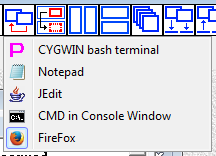
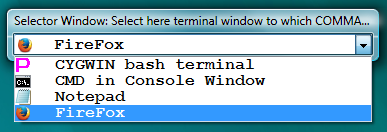
If you need to switch activity to the window that is residing in another workspace, use drop-down list in Selector Window.

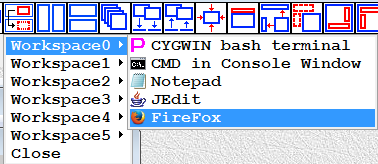
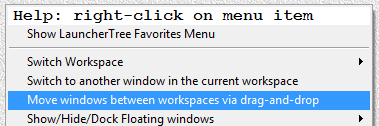
If you need to move window from one workspace to another use Workspace Navigator menu (drag window name and drop it on workspace name)

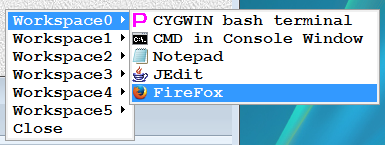
You can also use Workspace Switch Buttons with Ctrl or Shift key pressed to move active window or all non-minimized windows from current workspace (identified by workspace button that is highlighted by round-edge rectangle) to selected workspace (identified by the clicked workspace button).

4.248. IDH_MAIN_WINDOW_MENUBAR_TileCascadeMaximizeWillUseMaximizeRectangleOfWorkspaceWindowInsteadOfClientRectangle
Switches between two modes:
Main Window is visible
Main Window is hidden
Tile, Cascade and Maximize operations will position terminal windows and controlled external application windows:
 - inside of Internal (Client) Rectangle of the Main Window (if Main Window is visible)
 - inside of configured Maximization Rectangle of Main Window (if Main Window is hidden)
Internal Rectangle of the Main Window does not include Main Window frame borders and Main Window MenuBar (if they are present).
Maximization Rectangle of the Main Window is separate setting and can be set to:
- cover Current Monitor of Main Window minus taskbar
- cover Virtual Screen (All Monitors) minus taskbar
- cover Virtual Screen (All Monitors)
- cover First Monitor minus taskbar
- cover Second Monitor minus taskbar
- cover Third Monitor minus taskbar
- cover First and Second Monitor minus taskbar
- cover Second and Third Monitor minus taskbar
- cover First and Third Monitor minus taskbar
4.253. IDH_MAIN_WINDOW_POPUPMENU_CAPTURE_MOUSE_COORDINATES_IN_ACTIVE_WINDOW
This button only operates on the currently selected (highlighted) COMMAND, SCRIPT, AHK-SCRIPT or SUBTREE launcher.
4.253.1. Capturing one mouse position at the time:
In 5 seconds after this toolbar button is left clicked mouse pointer position inside of active window is captured relative to top left corner of active window. Toolbar button changes color after being left clicked and restores it’s color 5 seconds later (after the capture). Mouse position is stored by proxy32 in currently selected COMMAND, SCRIPT, AHK-SCRIPT or SUBTREE launcher. It is also displayed on the screen (as blue dot with number 00) after being captured/stored.
Every time this toolbar button is left clicked again, new mouse position with consecutive number (mouseposition[01], mouseposition[02] etc up to mouseposition[99]) is stored by proxy32 in currently selected COMMAND, SCRIPT, AHK-SCRIPT or SUBTREE launcher.
4.253.2. Capturing multiple mouse positions in quick succession:
To capture multiple mouse positions in quick succession (without waiting 5 seconds for next capture), left click this toolbar button while both Alt and Shift keys are pressed. Toolbar button will become blue. Then press and hold down left mouse button on this blue toolbar button and then, while holding left mouse button down, move the mouse pointer to the desired position in the external window. While left mouse button is being held down, tooolbar button still stay blue and every click with the right mouse button will capture next mouse position. Releasing left mouse button will end this capturing mode and toolbar button will become red again.
4.253.3. Deleting all mouse positions:
To delete all mousepositions stored in currently selected COMMAND, SCRIPT, AHK-SCRIPT or SUBTREE launcher, left click this toolbar button while Ctrl key is pressed.
4.253.4. Deleting last mouse position:
To delete last mouseposition stored in currently selected COMMAND, SCRIPT, AHK-SCRIPT or SUBTREE launcher, left click this toolbar button while Alt key is pressed.
4.253.5. Display all mouse positions:
To display (as blue dots with numbers) all mousepositions stored in currently selected COMMAND, SCRIPT, AHK-SCRIPT or SUBTREE launcher, left click this toolbar button while Shift key is pressed. The drawing may quickly disappear as active window may redraw itself on clicking or typing.
4.253.6. Shift all captured mouse positions by capturing new mouseposition[00]:
To capture new mouseposition[00] and move all other mousepositions (stored in currently selected COMMAND, SCRIPT, AHK-SCRIPT or SUBTREE launcher) by the difference between new mouseposition[00] and old mouseposition[00], left click this toolbar button while both Ctrl and Shift keys are pressed.
4.253.7. Using mouse positions stored in COMMAND/SCRIPT launcher:
When COMMAND Launcher (or line of the file referred in the NON-CSV SCRIPT launcher) is executed (it’s text is automatically typed) into external Window, in addition to typing text directly it also interpretes PROXYSEND substitution parameters to insert mouse, keyboard and delay events into COMMAND execution. Stored (in the current COMMAND/SCRIPT launcher) numbered mouse positions (numbered from 00 and up to 99) can be referred by their number inside of PROXYSEND substitution parameters. For example, left MouseClicks can be inserted into COMMAND text as substitution parameters <PROXYSEND_MCLP00>, <PROXYSEND_MCLP01>, <PROXYSEND_MCLP02> etc which use stored mouseposition[00], mouseposition[01], mouseposition[02] etc respectively. If MouseClicks are executed, proxy32 attempts to display /draw mousepositions that are being clicked (as blue dots with numbers) but that drawing of dots may not work well as active window may redraw itself on clicking or typing.
When executing SCRIPT line directly from SCRIPT editor window (and not by double-clicking on the SCRIPT launcher), this SCRIPT editor window does not have association with any launcher on the LauncherTree. Therefore, mousepositions in this case are taken from COMMAND, SCRIPT, AHK-SCRIPT or SUBTREE launcher that is highlighted on the LauncherTree.
4.253.8. Using mouse positions stored in AHK-SCRIPT launcher:
mouseposition[00] can be substituted as pair of numerical parameters <PROXYMOUSEX00> and <PROXYMOUSEY00> into the body of AHK-SCRIPT (AHK script text). Similarly, all mouseposition[01], mouseposition[02] etc respectively can be substituted into AHK-SCRIPT text on execution.
4.253.9. Using mouse positions stored in SUBTREE launcher:
Positions stored on the SUBTREE launcher are used by pre-COMMAND mouse click functionality of the COMMAND/SCRIPT launchers that are direct descendant of the SUBTREE launcher.
4.253.10. Using mouse positions when COMMAND WRAPPER mode is enabled:
In COMMAND WRAPPER mode, the designated WRAPPER launcher (it could be COMMAND or AHK-SCRIPT) is the one that is being executed. Double-clicked COMMAND (or SCRIPT) only provides substitution text for execution of WRAPPER launcher. Because WRAPPER launcher is the one that is actually executed, mouse positions associated with WRAPPER launcher are being used in WRAPPER mode.
4.257. IDH_MAIN_WINDOW_POPUPMENU_COPY_MOUSE_CAPTURED_COORDINATES

This button only operates on the currently selected (highlighted) COMMAND, SCRIPT, AHK-SCRIPT or SUBTREE launcher.
4.257.1. Paste all mouse positions:
Paste from clipboard all mousepositions to store in currently selected COMMAND, SCRIPT, AHK-SCRIPT or SUBTREE launcher
4.258. IDH_MAIN_WINDOW_POPUPMENU_DELETE_MOUSE_CAPTURED_COORDINATES

This button only operates on the currently selected (highlighted) COMMAND, SCRIPT, AHK-SCRIPT or SUBTREE launcher.
4.258.1. Deleting all mouse positions:
Delete all mousepositions stored in currently selected COMMAND, SCRIPT, AHK-SCRIPT or SUBTREE launcher.
4.287. IDH_MAIN_WINDOW_POPUPMENU_ENABLE_CLICK_MOUSEPOSITION_INCREMENT_AFTER_COMMAND_EXECUTION
This button toggles “Pre-COMMAND MouseClick Position ‘index’ Increment”. When enabled, increment is performed automatically after COMMAND/SCRIPT line execution to external window. ‘Index’ (parent_SUBMENU_mouse_position_index) variable is global for proxy32 and not local to any COMMAND launcher. ‘Index’ is initialized to 0 on proxy32 start and not stored on proxy32 exit. ‘Index’ selects one mouseposition from the sequence of mousepositions previously captured and stored in parent SUBMENU launcher. Indexed mouseposition is used by “Pre-COMMAND MouseMove or MouseClick” when “Pre-COMMAND MouseMove or MouseClick” is enabled.
Pressing this button while holding “Ctrl” - resets ‘index’ to 0
Pressing this button while holding “SHIFT” - opens dialog to set the value of the ‘index’
Pressing this button while holding “Alt” - increments ‘index’
Context of the ‘index’: “Pre-COMMAND MouseClick” is MouseMove or MouseClick that does not come from <PROXYSEND> events embedded into COMMAND/SCRIPT line. Instead, MouseMove or MouseClick (to active window) is automatically prepended (if enabled) during COMMAND/SCRIPT line execution to external window. “Pre-COMMAND MouseClick” can be enabled by separate (previous) button, that has three options: OFF, MouseMove, MouseClick. If MouseMove or MouseClick is selected, then mouse X,Y coordinates in active window will be needed in order to execute it. The mouse position of Pre-COMMAND MouseMove or MouseClick is taken from parent SUBMENU launcher if such parent SUBMENU launcher exists and it stores previously captured mouse positions.
If such parent SUBMENU does not exist or it does not store previously captured mouse positions, then only one mouse position (mouseposition[00]) is dynamically created and initialized to coordinates X=0 and Y=0 so that MouseMove or MouseClick can still be executed (mousepositions are in coordinates relative to top left corner of active window).
If such parent SUBMENU exists and it stores previously captured mouse positions, then mouse position of Pre-COMMAND MouseMove or MouseClick is taken from parent SUBMENU launcher. If “Mouse Position Increment” is enabled, first COMMAND/SCRIPT line execution to external window is prepended by MouseClick at stored mouseposition[‘index’], then after the execution ‘index’ value is incremented, so the second COMMAND/SCRIPT line execution to external window is prepended by MouseClick at stored mouseposition[‘old index value’+1], etc until there are no more stored mousepositions available. Therefore, consecutive executions will use different stored mousepositions.
Number of captured and stored mousepositions per each storing launcher is not limited but “Pre-COMMAND incremental MouseClick” functionality can only make use of up to 100 first captured mousepositions (mouseposition[00]-mouseposition[99]). When value of ‘index’ attempts to increment beyond number of stored mouse positions or beyond 99, proxy32 will show error message.
If “Mouse Position Increment” is disabled, every COMMAND/SCRIPT line execution to external window is prepended by MouseClick at the same stored mouseposition[‘index’].
The intended use case for this ‘increment’ functionality is to send the same COMMAND/SCRIPT line to multiple terminal windows when such terminal windows exist inside of remote desktop window or inside of VM console window that contains guest desktop. Guest/Remote Desktop window in such case should be set as proxy32 “active” window. “Pre-COMMAND incremental MouseClick” sets focus to the next terminal window inside of Guest/Remote Desktop before COMMAND text is typed to Guest/Remote Desktop window. COMMANDs and SCRIPT lines located under common parent SUBMENU share set of mousepositions stored in their common parent SUBMENU launcher.
4.320. IDH_MAIN_WINDOW_POPUPMENU_PASTE_MOUSE_CAPTURED_COORDINATES

This button only operates on the currently selected (highlighted) COMMAND, SCRIPT, AHK-SCRIPT or SUBTREE launcher.
4.320.1. Deleting all mouse positions:
Delete all mousepositions stored in currently selected COMMAND, SCRIPT, AHK-SCRIPT or SUBTREE launcher.
4.325. IDH_MAIN_WINDOW_POPUPMENU_SEARCH_FOR_MOUSE_CAPTURED_COORDINATES

Highlight COMMAND, SCRIPT, AHK-SCRIPT or SUBTREE launchers that contain captured mouse positions
4.331. IDH_MAIN_WINDOW_POPUPMENU_SHOW_MOUSE_CAPTURED_COORDINATES

This button only operates on the currently selected (highlighted) COMMAND, SCRIPT, AHK-SCRIPT or SUBTREE launcher.
4.331.1. Display all mouse positions:
Display (as blue dots with numbers) all mousepositions stored in currently selected COMMAND, SCRIPT, AHK-SCRIPT or SUBTREE launcher. The drawing may quickly disappear as active window may redraw itself on clicking or typing.
4.334. IDH_MAIN_WINDOW_POPUPMENU_SWITCH_TO_ANOTHER_WINDOW_IN_WORKSPACE
This menu item
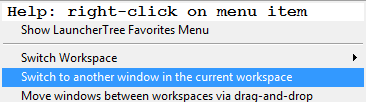
shows list of windows in current workspace, shows which of those windows is currently active and allows to switch activity to another window in current workspace.
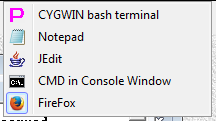
If you need to switch activity to the window that is residing in another workspace, use drop-down list in Selector Window.
If you need to move window from one workspace to another use Workspace Navigator menu (drag window name and drop it on workspace name)
You can also use Workspace Switch Buttons with Ctrl or Shift key pressed to move active window or all non-minimized windows from current workspace (identified by workspace button that is highlighted by round-edge rectangle) to selected workspace (identified by the clicked workspace button).
4.371. IDH_OPTIONS_PAGE_DEBUG_SETTINGS
Options Dialog, “Debug” page - used for Experimental/Test/Debug purposes
Do not mess with those Debug settings, they all should be unchecked for normal operation of the program!!
4.372. IDH_OPTIONS_PAGE_EXIT_SHUTDOWN
test
4.373. IDH_OPTIONS_PAGE_FONTS_AND_COLORS
Options Dialog, “Fonts and Colors” page
“Font”
“Allows user to choose Font used by named component. Selection is immediately applied.”
“Colors”
“Allows user to choose Background and then Foreground Colors used by named component. Selection is immediately applied.”
4.374. IDH_OPTIONS_PAGE_GRAB
test
4.375. IDH_OPTIONS_PAGE_HEALTH_MONITOR
test
4.376. IDH_OPTIONS_PAGE_MINIMIZED_WINDOW
“This page allows to configure appearance and behavior of minimized windows in the workspace.”
4.377. IDH_OPTIONS_PAGE_PASSWORD_SECURITY
test
4.378. IDH_OPTIONS_PAGE_TLS_SERVER_DISCONNECT_POLICIES
Options dialog page that allows to manage TLS server disconnect policies
4.379. IDH_OPTIONS_PAGE_TLS_SERVER_MANAGE_PFX_STORE
Options dialog page that allows to manage PFX certificate store
4.380. IDH_OPTIONS_PAGE_TLS_SERVER_RSA_CERTIFICATE_AUTOLOAD_ON_START
Options dialog page that allows to select how TLS server certificate will be loaded on start
4.381. IDH_OPTIONS_PAGE_TLS_SERVER_RSA_CERTIFICATE_CREATE_ROOT
Options dialog page that allows to select how TLS server root certificate will be created
4.382. IDH_OPTIONS_PAGE_TLS_SERVER_RSA_CERTIFICATE_CREATE_TEMP
Options dialog page that allows to select how TLS server temporary certificate will be created
4.383. IDH_OPTIONS_PAGE_TLS_SERVER_RSA_CERTIFICATE_LOAD
Options dialog page that allows to select how TLS server certificate will be loaded
4.384. IDH_OPTIONS_PAGE_TLS_SERVER_RSA_CERTIFICATE_MAIN_PAGE
Options dialog page that allows to select how TLS server certificate will be configured
4.385. IDH_OPTIONS_PAGE_TLS_SERVER_RSA_CERTIFICATE_ROOT_LOAD
Options dialog page that allows to load server root certificate
4.386. IDH_OPTIONS_PAGE_TLS_SERVER_TRUSTED_STORE
Options dialog page that allows to set TLS server trusted store
4.387. IDH_OPTIONS_PAGE_TLS_SET_CIPHERSUITES_FOR_THIS_PC
Options dialog page that allows to set ciphersuites for this PC
4.388. IDH_OPTIONS_PAGE_TLS_SET_PROTOCOL_VERSION
Options dialog page that allows to set SSL/TLS protocol version
4.389. IDH_OPTIONS_PAGE_VISUAL_CLUES
Options dialog page that allows to set visual clues
4.390. IDH_OPTIONS_PAGE_WINDOW_BEHAVIOR
Options Dialog, “Window Behavior” page
“LauncherTreeWindowMovementFollowsWorkspaceWindowMovement”
“When this option is selected, LauncherTree keeps its position relative to workspace window when workspace window is moved/resized.”
“AppBarWindowMovementFollowsWorkspaceWindowMovement”
“When this option is selected, AppBar keeps its position relative to workspace window when workspace window is moved/resized.”
“HideShowTopbarAndTreeOnMinMaxRestoreWorkspace”
“When this option is selected, Minimizing workspace window will automatically hide Proxy LauncherTree and AppBar windows. Maximizing/restoring workspace window will automatically show Proxy LauncherTree and AppBar windows.”
“SmallAppbarWindow”
“When this option is selected, uses Small AppBar window. (AppBar Icons/Font: Large is 32 pixels, Small is 16 pixels)”
“ZoomWindowOnSelectionFromList”
“When this option is selected, Application Window will be maximized inside of the workspace on selection from the list and on creation/grab.”
4.391. IDH_SCRIPTEDITOR_EXECUTE_COMMAND_FROM_SELECTED_LINE_IN_SCRIPT_EDITOR
If there is a text selection in SCRIPT editor window then this button will choose the text line (CSV row) on which selection is starting, otherwise, it will choose text line (CSV row) that contains text cursor (caret).
If SCRIPT file name does not end with “.csv” (case-insensitive):
This button executes text line chosen into the ACTIVE window in the same workspace as if this line would be configured in the COMMAND launcher.
If SCRIPT file name does end with “.csv” (case-insensitive):
This button uses CSV row chosen (except for the first CSV row of the editor buffer which is considered to be CSV header) to create Proxy32 named parameters and set their values. First CSV row of the editor buffer (column names) defines created parameter names and CSV row chosen defines values for those named parameters. Setting cursor on another CSV row (or starting text selection on another CSV row) and pressing this button will set values of named parameters to fields from the newly chosen CSV row. After named parameter’s values are set/updated from the chosen CSV row, Highlighted Launcher on LauncherTree is automatically executed.
4.392. IDH_SCRIPTEDITOR_EXECUTE_COMMAND_FROM_SELECTED_LINE_IN_SCRIPT_EDITOR_AND_MOVE_SELECTION_TO_NEXT_LINE
If there is a text selection in SCRIPT editor window then this button will choose the text line (CSV row) on which selection is starting, otherwise, it will choose text line (CSV row) that contains text cursor (caret).
If SCRIPT file name does not end with “.csv” (case-insensitive):
This button executes text line chosen into the ACTIVE window in the same workspace as if this line would be configured in the COMMAND launcher.
If SCRIPT file name does end with “.csv” (case-insensitive):
This button uses CSV row chosen (except for the first CSV row of the editor buffer which is considered to be CSV header) to create Proxy32 named parameters and set their values. First CSV row of the editor buffer (column names) defines created parameter names and CSV row chosen defines values for those named parameters. Setting cursor on another CSV row (or starting text selection on another CSV row) and pressing this button will set values of named parameters to fields from the newly chosen CSV row. After named parameter’s values are set/updated from the chosen CSV row, Highlighted Launcher on LauncherTree is automatically executed.
After execution text selection is moving to the next line.
4.393. IDH_SCRIPTEDITOR_FILE_EXIT
“Close ScriptEditor window”
4.394. IDH_SCRIPTEDITOR_FILE_NEW
“Create new file”
4.395. IDH_SCRIPTEDITOR_FILE_OPEN
“Open file from disk”
4.396. IDH_SCRIPTEDITOR_FILE_SAVE
“Save file to disk”
4.397. IDH_SCRIPTEDITOR_FILE_SAVEAS
“Save file to disk under given name”
4.398. IDH_SCRIPTEDITOR_INSERT_CHARACTER
Insert new character
4.399. IDH_SCRIPTEDITOR_INSERT_EXISTING_NAMED_PARM
“Insert existing named parameter/password”
4.400. IDH_SCRIPTEDITOR_INSERT_NEW_PARM_PASS_LINE
“Insert new parameter/password/i-line”
4.401. IDH_SCRIPTEDITOR_LOAD_ALL_COMMANDS_FROM_SELECTED_SUBTREE_INTO_EDITOR_WINDOW
Load all COMMANDs from selected (highlighted) SUBTREE into editor window. If no SUBTREE is selected when button is pressed, the whole LauncherTree is processed. Text is loaded into Editor buffer in the memory into cursor position or it is replacing current selection in the buffer. Please, do not forget to save the file to disk before closing editor window or before trying to invoke external viewer.
When Shift key is pressed while clicking on the button, the scan will not expand the tree and will not highlight processed COMMAND launchers.
When Ctrl key is pressed while clicking on the button, the scan will not check nested SUBTREEs.
When Alt key is pressed while clicking on the button, after all commands are loaded all named parameters/passwords with non-empty values will be replaced by their values in the Script Editor window memory buffer.
4.402. IDH_SCRIPTEDITOR_MERGE_SELECTED_LINES_INTO_ONE_LINE_BY_REMOVING_CR_BEFORE_NL
Merge Selected Lines into one line by removing CR before NL
4.403. IDH_SCRIPTEDITOR_OPEN_CURRENT_SCRIPT_FILE_IN_EXTERNAL_VIEWER
“Open current script file in configured external viewer (the same as terminal log viewer).”
4.404. IDH_SCRIPTEDITOR_SET_CURSOR_LINE_FOR_NEXT_MANUAL_EXEC_STEP
If there is a text selection in SCRIPT editor window then this button will choose the text line (CSV row) on which selection is starting, otherwise, it will choose text line (CSV row) that contains text cursor (caret).
If SCRIPT file name does not end with “.csv” (case-insensitive):
Sets the line under cursor as next line for manual execution. Manual execution is when SCRIPT is executed to external window. In such case each double-left-click on NON-CSV SCRIPT launcher will execute next line from the NON-CSV SCRIPT as if this line was text of COMMAND launcher. NON-CSV SCRIPT next line number is global counter shared by all NON-CSV SCRIPT executions. It is single global variable stored in LauncherTree. It can also be set by CtrlDblLeftClick on any NON-CSV SCRIPT launcher.
If SCRIPT file name does end with “.csv” (case-insensitive):
Uses CSV row under cursor (except for the first CSV row of the editor buffer which is considered to be CSV header) to create Proxy32 named parameters and set their values. First CSV row of the editor buffer (column names) defines created parameter names and CSV row under cursor defines parameter values. Setting cursor on another CSV row and pressing this button will set values of named parameters to fields from the CSV row under cursor. Sets the line under cursor as next line for manual execution. Manual execution is when double-left-click on CSV SCRIPT launcher will use next line from the CSV SCRIPT to set values of named parameters. CSV SCRIPT next line number is global counter shared by all CSV SCRIPT executions. It is single global variable stored in LauncherTree. It can also be set by CtrlDblLeftClick on any CSV SCRIPT launcher.
4.405. IDH_SCRIPTEDITOR_SHOW_HIDE_SELECTOR_AND_LAUNCHERTREE_WINDOWS
Show/Hide ActiveTerminalSelector and LauncherTree windows at their current position and size (shortcut: DoubleClick on the title of Workspace, ActiveTerminalSelector or LauncherTree windows, or on the background of Workspace window)
4.406. IDH_SCRIPTEDITOR_SPLIT_SELECTED_LINE_INTO_SEVERAL_LINES_BY_ADDING_CR_BEFORE_NL
Split Selected Line into several lines by adding CR before NL
4.407. IDH_SCRIPTEDITOR_TOGGLE_SCRIPT_LINE_TOOLTIP
Toggle Tooltips for SCRIPT lines
4.408. IDH_SCRIPTEDITOR_VIEW_FONT
“Set Editor font”
4.409. IDH_SCRIPTEDITOR_VIEW_SELECT_BACKGROUND_COLOR
“Set Editor window background color”
4.410. IDH_SCRIPTEDITOR_VIEW_SELECT_TEXT_COLOR
“Set Editor window Foreground color”
4.411. IDH_SWITCH_TO_DEFAULT_DESKTOP
“Switches to Default Windows Desktop (if Proxy32 is running on its own dedicated Windows desktop)”
4.421. IDH_TERMINAL_CHAR_SPACE_DECREASE
“Every time you select this option the width of the char in the PROXYTERM working area will be decreasing by one point. This may help to sqeeze more text lines into the same PROXYTERM working area. If the char width is decreased too much, the text may become unreadable - use next menu item to restore default char width.”
4.422. IDH_TERMINAL_CHAR_SPACE_RESTORE
“Restore default width of the char in the PROXYTERM working area (set it equal to the font char width).”
4.423. IDH_TERMINAL_CLIPBOARD_VIEWER_WINDOW
test
4.424. IDH_TERMINAL_CONTROL_ADD_HEXDUMP_TO_LOG_FILE
“Add hex dump to terminal log file”
4.425. IDH_TERMINAL_CONTROL_ADD_TIMESTAMPS_TO_TERMINAL_LOG_FILE
“TerminalAddTimeStampsToTerminalLogFile”
4.426. IDH_TERMINAL_CONTROL_ARROWS_ARE_INITIALLY_IN_APPLICATION_MODE
“Terminal_ArrowsAreInitiallyInApplicationMode”
4.427. IDH_TERMINAL_CONTROL_BREAK
“Send telnet break command to the remote host”
4.428. IDH_TERMINAL_CONTROL_CONNECT_LISTENER_COMPORT_FROM_SELECTED_TREENODE
“Connect listener COM-PORT using info from selected TreeNode”
4.429. IDH_TERMINAL_CONTROL_DISABLE_ARROWS_APPLICATION_MODE
“Terminal_Disable_ArrowsApplicationMode”
4.430. IDH_TERMINAL_CONTROL_DISABLE_CURSOR_POSITION_REPORTING
“Terminal_Disable_Cursor_Position_Reporting”
4.431. IDH_TERMINAL_CONTROL_DISABLE_NUMPAD_APPLICATION_MODE
“Terminal_Disable_NumpadApplicationMode”
4.432. IDH_TERMINAL_CONTROL_Disable_Paste_by_Keyboard
“Disable_Paste_by_Keyboard”
4.433. IDH_TERMINAL_CONTROL_Disable_Paste_by_Mouse
“Disable_Paste_by_Mouse”
4.434. IDH_TERMINAL_CONTROL_DISABLE_REMOTE_CONTROLLED_LOG_FILE_NAME_CHANGING
“Terminal_Disable_Remote_Controlled_Log_File_Name_Changing”
4.435. IDH_TERMINAL_CONTROL_DISABLE_REMOTE_CONTROLLED_WINDOW_TITLE_CHANGING
“Terminal_Disable_Remote_Controlled_Window_Title_Changing”
4.436. IDH_TERMINAL_CONTROL_DISCONNECT
“Disconnect this PROXYTERM window from the remote host (including stopping any SCRIPT/PLUGIN if such was running in this PROXYTERM window/session)”
4.437. IDH_TERMINAL_CONTROL_DISCONNECT_ALL_CLIENTS
“Disconnect all TELNET clients connected to the TSS telnet server of this PROXYTERM window”
4.438. IDH_TERMINAL_CONTROL_DISCONNECT_LISTENER_COMPORT
“Disonnect listener COM-PORT”
4.439. IDH_TERMINAL_CONTROL_DISCONNECT_SELECTED_CLIENT
“Disconnect selected (in the clients drop-down list) TELNET client connected to the TSS telnet server of this PROXYTERM window”
4.440. IDH_TERMINAL_CONTROL_DO_NOT_SEND_NAWS
“NAWS - Negotiation about Window Size - is the TELNET command sequence that is sent by terminal to remote host to notify remote host about character width and height of the connected terminal. This guarantees correct work of the terminal-dependent programs on the remote host. UNIX/LINUX/CYGWIN shell and vi will receive NAWS via TELNET daemon/server and X/Y dimensions on tty terminal interface will be reset to correct values to ensure correct functioning of terminal-aware programs. Proxy Terminal will send NAWS to telnet server on connect and when user changes size of proxy terminal window. Proxy Terminal will also send NAWS to SHELL on connect and when user changes size of proxy terminal window ONLY if start command line of SHELL contains substring ‘proxycygterm’. ‘proxycygterm.exe’ is capable to decode NAWS that it receives over STDIN and translate them into dimentions of tty interface on which it is running CYGWIN shell or other terminal-dependent CYGWIN program. Thre is no point in sending NAWS to Windows ‘cmd’ program that is running as SHELL. ‘cmd’ will not understand NAWS, so Proxy terminal does not send it. Default behavior is as described above, but there are some situations when you may want to completely disable NAWS for particular terminal. For example, if you are sharing your terminal window via TSS with other telnet terminal, both terminals will send NAWS to remote host on window size changes. This may confuse the remote host and terminal-dependent application (such as vi) will dispaly correctly only on one terminal (the one that has sent NAWS last). To let the other (non-proxy) terminal to control remote host tty size, you may want to disable NAWS completely in the proxy terminal. This way the other terminal will not be impacted if you change size of the shared proxy terminal window. When (I-)PLUGIN or (I-)SCRIPT is running in the proxy terminal, NAWS will not be sent by the proxy terminal to prevent changes in the remote host responses that are received/analyzed by the running (I-)PLUGIN or (I-)SCRIPT.”
4.441. IDH_TERMINAL_CONTROL_DO_NOT_SEND_NEWLINE_TO_LISTENER_COMPORT
“Terminal_Spare_Setting_07”
4.442. IDH_TERMINAL_CONTROL_DO_NOT_SEND_NEWLINE_TO_SHELL
“Terminal_Spare_Setting_07”
4.443. IDH_TERMINAL_CONTROL_DO_NOT_SEND_NEWLINE_TO_SHELL_IS_AUTOMATIC
“Terminal_Spare_Setting_07”
4.444. IDH_TERMINAL_CONTROL_DO_NOT_SEND_NEWLINE_TO_TARGET_COMPORT
“Terminal_Spare_Setting_07”
4.445. IDH_TERMINAL_CONTROL_DO_NOT_SEND_NEWLINE_TO_TARGET_TELNET
“Terminal_Spare_Setting_07”
4.447. IDH_TERMINAL_CONTROL_DO_NOT_SHOW_TITLEBAR
Removes Titlebar from Terminal window
4.448. IDH_TERMINAL_CONTROL_ECHO_KBD_PASTE_TO_TERMINAL_LOCALLY
“Normally, all typed or pasted text is echoed back by the remote host. In some rare cases it does not work and user may not be able to see what is he/she typing or pasting. This option will turn local echo inside of the proxy terminal to allow user to see what is he/she typing or pasting. Useful when running CMD prompt in SHELL-TERMINAL terminal.”
4.449. IDH_TERMINAL_CONTROL_Enable_UNICODE_Input_from_Keyboard_IME_Paste_COMMAND_SCRIPT
“Normally, Proxy32 terminal translates all UNICODE user input (Keyboard, IME, Paste, COMMAND, SCRIPT/I-SCRIPT) into ASCII characters before sending it to remote host. In particular, by default, it is bypassing MS Windows language and keyboard layouts translation. If this option is enabled, Proxy32 terminal translates all UNICODE user input (Keyboard, IME, Paste, COMMAND, SCRIPT/I-SCRIPT) into UTF8 characters before sending it to remote host”
4.450. IDH_TERMINAL_CONTROL_FLIP_RO_SELECTED_CLIENT
“Make selected (in the clients drop-down list) TELNET client (connected to the TWS telnet server of this PROXYTERM window) unable to type through the TSS (read-only client). This is flipping boolean between read-only and read-write every time you select this option.”
4.451. IDH_TERMINAL_CONTROL_FORCE_TERMINAL_SIZE_TO_80X24
Force Terminal Size to 80x24
4.452. IDH_TERMINAL_CONTROL_KEEPALIVE
“If enabled, PROXYTERM will send TELNET NOP (no operation) command to the remote telnet host in order to create some TCP traffic and prevent TCP disconnect on idle timeout”
4.453. IDH_TERMINAL_CONTROL_KILL_SCRIPT_PLUGIN
“Select this menu item to stop SCRIPT/PLUGIN execution”
4.454. IDH_TERMINAL_CONTROL_LOGGING_TO_FILE
“Log terminal screen to the file”
4.455. IDH_TERMINAL_CONTROL_NUMPAD_IS_INITIALLY_IN_APPLICATION_MODE
“Terminal_NumpadIsInitiallyInApplicationMode”
4.456. IDH_TERMINAL_CONTROL_PASTE_ON_LEFTCTRLMIDDLECLICK_INSTEAD_OF_MIDDLECLICK
“Terminal_Paste_On_LeftCtrlMiddleClick_instead_of_MiddleClick”
4.457. IDH_TERMINAL_CONTROL_Print_Ambiguous_CJK_chars_as_wide
“Print Ambiguous CJK chars as wide”
4.458. IDH_TERMINAL_CONTROL_Print_Received_CarriageReturn_as_CRNL
“Normally, received CR and NL should be treated as separated characters. In some rare cases user may need to treat received NL (or CR) as a combination of CR/NL. Useful when executing some CYGWIN commands via CMD prompt that is running inside of SHELL-TERMINAL terminal.”
4.459. IDH_TERMINAL_CONTROL_Print_Received_NewLine_as_CRNL
“Normally, received CR and NL should be treated as separated characters. In some rare cases user may need to treat received NL (or CR) as a combination of CR/NL. Useful when executing some CYGWIN commands via CMD prompt that is running inside of SHELL-TERMINAL terminal.”
4.460. IDH_TERMINAL_CONTROL_Print_Received_NewLine_as_CRNL_Auto
“Normally, received CR and NL should be treated as separated characters. In some rare cases user may need to treat received NL (or CR) as a combination of CR/NL. Useful when executing some CYGWIN commands via CMD prompt that is running inside of SHELL-TERMINAL terminal. This switch allows to set value of “Print_Received_NewLine_as_CRNL” automatically (on connecting terminal to shell) depending on the shell type (name) in SHELL-TERMINAL. For proxywinconsole it is set to FALSE and for other types of shells it is set to TRUE. “
4.461. IDH_TERMINAL_CONTROL_RECONNECT
“Repeat ‘connection to remote host’ (including autostart of related SCRIPT/PLUGIN, if any) procedure for this PROXYTERM”
4.462. IDH_TERMINAL_CONTROL_REMOVE_MOUSE_SELECTION_WHEN_ERASE_ALL_DISPLAY_IS_REQUESTED
“Terminal_RemoveMouseSelectionWhenEraseAllDisplayIsRequested”
4.463. IDH_TERMINAL_CONTROL_Replace_Unicode_Hyphen_x2010_by_ASCII_Minus
“Replace_Unicode_Hyphen_x2010_by_ASCII_Minus”
4.464. IDH_TERMINAL_CONTROL_REPORT_TELNETTERMINALTYPE_AS_XTERM_INSTEAD_OF_VT100
“Terminal_Report_TelnetTerminalType_as_xterm_instead_of_vt100”
4.465. IDH_TERMINAL_CONTROL_REREGISTER_CLIPBOARDVIEWER
“If some poorly written application is registered with Windows to receive clipboard content change notification and it is not passing those notifications to the Proxy and to other applications, you may need to re-register Proxy with Windows in order to be able to receive clipboard content change notifications again (to display correctly clipboard content in the PROXYTERM clipboard viewer). This option re-registers Proxy with Windows to receive clipboard content change notifications. Use it if you think that your PROXYTERM clipboard viewers are not reacting to clipboard changes. This option may be needed in extremally rare cases.”
4.466. IDH_TERMINAL_CONTROL_RESETVT100
“Reset VT100 terminal emulator”
4.467. IDH_TERMINAL_CONTROL_RESTART_LOG_FILE_ON_WINDOW_TITLE_CHANGE
Re-start Terminal Log File on window title change
4.468. IDH_TERMINAL_CONTROL_RESTART_TERMINAL_LOG_FILE
“Restart Terminal Log File. Closes current terminal log file and opens new one. New log file name will be generated from current window title. Could be useful if output of some command should be logged into separate file.”
4.469. IDH_TERMINAL_CONTROL_SCROLLBUFFER_ON_THE_FILE
“Enable to extend default memory-only terminal scrollbuffer via temporary disk file, this will allow for unlimited scrollback in the terminal.”
4.470. IDH_TERMINAL_CONTROL_SEND_STTY_COLUMNS_X_ROWS_Y
“Send ‘stty columns <PROXYTERMINALCOLUMNS> rows <PROXYTERMINALROWS>’ to remote host. When application on the remote host needs to know size of your terminal (like in case of vi text editor) there are three ways to communicate this information to remote host:
when you resize your own terminal window it will send telnet NAWS command to remote host (this may not work if remote host is reached via chain of telnet connections or via COM-port)
application (like UNIX resize command) can query your terminal size using ESC-sequences and terminal will reply back (this may not work if many terminals share the same session and they will all respond with different values and confuse the remote application)
if remote system is UNIX/LINUX user can manually set the terminal size information on remote host (via stty command) before starting application (like vi).”
4.475. IDH_TERMINAL_CONTROL_SHOW_TREENODE_FROM_WHICH_TERMINAL_WAS_STARTED
“Show TreeNode that holds TARGET connection info for this Terminal”
4.476. IDH_TERMINAL_CONTROL_SPARE_BOOL_SETTING_00
“Terminal_Spare_Setting_00”
4.477. IDH_TERMINAL_CONTROL_Use_Clear_Text_Antialiasing_Instead_of_Grayscale_Antialiasing
“Terminal_Use_Clear_Text_Antialiasing_Instead_of_Grayscale_Antialiasing”
4.478. IDH_TERMINAL_CONTROL_DISABLE_ANTIALIASING_FOR_TERMINAL_FONT
“Terminal_Disable_Antialiasing_For_Terminal_Font”
4.479. IDH_TERMINAL_CONTROL_USE_SYSTEM_FONTS_INSTEAD_OF_EMBEDDED_FONT
“Terminal_Use_System_Fonts_Instead_Of_Embedded_Font”
4.480. IDH_TERMINAL_CONTROL_TERMINAL_AUTOSCROLL_ON_NEW_DATA
“By default new output arriving to terminal forces terminal to scroll to the bottom of the scrollbuffer to show new output from the remote host. It will prevent user from manually scrolling up and down in the terminal buffer (to view or select text) while the new output from the remote host is constantly arriving to terminal. Temporarily disabling autoscroll may help in this situation.”
4.481. IDH_TERMINAL_CONTROL_TERMINAL_DO_NOT_SEND_INPUT_TO_SCREENBUFFER
“By default new output is arriving to both terminal log file and (via VT100 command interpreter) to the screenbuffer of terminal. If this setting is enabled, new output arriving from the remote host will be written to terminal log file but will not be written to terminal screenbuffer file and displayed in terminal window. This may be useful when new output is arriving too fast to display in the real time or when new input has so much data that it is desirable to conserve disk space by having only terminal log file and not having much larger terminal scrollbuffer file. The new output that has arrived while this option was enabled will only be accessible by opening terminal log file in the text editor.”
4.482. IDH_TERMINAL_CONTROL_TERMINAL_SESSION_SHARING_SERVER_LISTENS_ONLY_ON_LOOPBACK_IP
“TERMINAL_SESSION_SHARING_SERVER_LISTENS_ONLY_ON_LOOPBACK_IP - 127.0.0.1. This option may be useful to protect session sharing port by some local port redirector or by tunneling software like stunnel.”
4.483. IDH_TERMINAL_CONTROL_TIMESTAMPING
“If enabled, every 30 seconds the timestamp will be inserted into PROXYTERM scrollbuffer”
4.484. IDH_TERMINAL_CONTROL_TRY_TO_RECONNECT_TERMINAL_FROM_SELECTED_TREENODE
“Connect this Terminal using TARGET info from selected TreeNode”
4.485. IDH_TERMINAL_CONTROL_USE_SSL_TLS_TO_ENCRYPT_TELNET_TRAFFIC_FROM_TERMINAL_SESSION_SHARING_SERVER
“Terminal Session Sharing Server (Telnet server) is built-in into every ProxyTerm window. If this boolean is TRUE, Terminal Session Sharing server will expect Telnet+(SSL/TLS) connection from the client intead of simple Telnet.”
4.486. IDH_TERMINAL_Do_Not_Play_Sound_On_Receiving_BELL_Char
“Do_Not_Play_Sound_On_Receiving_BELL_Char”
4.487. IDH_TERMINAL_DO_NOT_SHOW_CONTROLS
Hide all controls in the terminal window to the right and to the bottom of the text area. This includes terminal sharing controls, search, bookmarks and log buttons, search_results/auto_command_history drop down lists, clipboard viewer, PLUGIN/(I)-SCRIPT controls (to the bottom of the terminal text area) and and fine/coarse scrollbars (to the right of the terminal text area). Menubar and titlebar/frame are controlled by separate menu switches. To Kill (I)-SCRIPT/PLUGIN in the absence of “Kill PLUGIN/(I)-SCRIPT” terminal button use separate menu switch via Terminal popup menu (Ctrl-RightClick in Terminal Text Area).
4.488. IDH_TERMINAL_EDIT_BOOKMARK
“Bookmark the first line of the selection in the ‘search results drop-down list’ for future quick navigation through bookmarks and search results (matches) that are accumulated in the ‘search results drop-down list’ located at the bottom right-hand corner of the PROXYTERM window.”
4.489. IDH_TERMINAL_EDIT_CLEAR_COMMAND_HISTORY
“Clear Commands History list”
4.490. IDH_TERMINAL_EDIT_CLEAR_SEARCH
“Clear the ‘search results drop-down list’ that holds search results (matches) and bookmarks”
4.491. IDH_TERMINAL_EDIT_COPY_HISTORY_LIST_TO_CLIPBOARD
“Copy content of the commands history drop-down list to clipboard”
4.492. IDH_TERMINAL_EDIT_COPY_SEARCH_LIST_TO_CLIPBOARD
“Copy content of the search results drop-down list to clipboard”
4.493. IDH_TERMINAL_EDIT_DELETE_SELECTED_SEARCH_RESULT
“Delete the search result (match) or bookmark that is selected in the ‘search results drop-down list’”
4.494. IDH_TERMINAL_EDIT_GO_TO_FIRST_LINE_OF_SELECTION
“Scroll to show first line of selection”
4.495. IDH_TERMINAL_EDIT_GO_TO_LAST_LINE_OF_SELECTION
“Scroll to show last line of selection”
4.496. IDH_TERMINAL_EDIT_GO_TO_NEXT_SEARCH_RESULT
“Go to the next search result (match) or bookmark in the ‘search results drop- down list’”
4.497. IDH_TERMINAL_EDIT_GO_TO_PREVIOUS_SEARCH_RESULT
“Go to the previous search result (match) or bookmark in the ‘search results drop-down list’”
4.498. IDH_TERMINAL_EDIT_PASTE
“Paste clipboard content to the remote host”
4.499. IDH_TERMINAL_EDIT_SEARCH
“Search in the whole terminal buffer or (if there is multiline selection present) in multiline selection. What search is used (whole buffer or multiline selection) you can find out from the title of the search dialog. Search pattern uses PERL Regular Expressions syntax and can be case-sensitive or case- insensitive. It goes line by line through your terminal buffer as you see it on the screen. It does not un-wrap lines that are wrapped by the right border of PROXYTERM window. To combine different patterns by OR use pipe symbol ‘|’. Bookmarked lines, search matches, matching lines and their positions in the PROXYTERM scrollbuffer are stored in the ‘search results drop-down list’ located at the bottom right-hand corner of the PROXYTERM window. To populate this list use ‘search’ (‘S’) or ‘bookmark’ (‘B’) buttons located to the left of this list (or corresponding commands in the PROXYTERM Edit WindowMenu). To automatically jump (scroll to the match/bookmark and highlight it) directly to the match/bookmark just select desired entry in this list. To cycle through matches/bookmarks in this list use ‘next’ (‘N’) or ‘previous’ (‘P’) buttons located to the left of this list (or corresponding commands in the PROXYTERM Edit WindowMenu). Number of matches/bookmarks in the list is programmatically limited to 1000 for the performance reasons. If you have already accumulated 1000 matches/bookmarks in the list as a result of one or many sequential searches or bookmarking activity, you will get a warning and you will have to make some free space in the list by deleting selected matches or clearing content of the whole list. To do this use ‘delete selected’ (‘D’) or ‘clear the whole list’ (‘C’) buttons located to the left of this list (or corresponding commands in the PROXYTERM Edit WindowMenu).”
4.500. IDH_TERMINAL_FILE_CHANGE_TITLE_OF_TERMINAL_WINDOW
“Change title of terminal window and (if enabled) restart terminal log file with new name made of new window title”
4.501. IDH_TERMINAL_FILE_EXIT
“Close PROXYTERM window/session. Remote TELNET host (or local COM-PORT or local SHELL) and all TSS telnet clients will be disconnected.”
4.502. IDH_TERMINAL_FILE_PROPAGATE_TERMINAL_SETTINGS_TO_NONMINIMIZED_TERMINALS_IN_THE_SAME_WORKSPACE
Following Terminal Menu settings are propagated to other non-minimized terminals in the same workspace:
“Do not show Menu Bar”
“Do not show controls”
“Do not show title bar”
“Shared Input Mode”
4.503. IDH_TERMINAL_FILE_SAVE_TERMINAL_SETTINGS_AS_DEFAULTS_FOR_NEW_TERMINALS
Save this Terminal settings as default initial values for creation of new terminal windows. Following Terminal Menu settings are saved:
“Terminal Size/Position, Colors, Font and Line/Char spacing”
“Do not show Menu Bar”
“Do not show controls”
“Do not show title bar”
“Shared Input Mode”
“Enable unlimited scrollbuffer on the temporary file”
“Log terminal screen to the file”
“Add hex dump to terminal log file”
“TSS Server denies new connections”
4.504. IDH_TERMINAL_FIXED_SPEED_SCROLLBAR
“This is high precision scrollbar which tries to achieve fixed scrolling speed regardless of the size of the scrollbuffer. It only scrolls approximately 200- 300 lines up or down from the position of the main scrollbar. It is useful when main scrollbar becomes ‘jerky’ when the number of lines in the terminal scrollbuffer goes above tens of thousands. When the main scrollbar becomes ‘jerky’, use ‘main’ scrollbar only to get to the approximate position in the scrollbuffer and then use ‘high precision/fixed speed’ scrollbar (or mouse wheel scrolling) to fine-tune your position in the scrollbuffer.”
4.505. IDH_TERMINAL_LINE_SPACE_DECREASE
“Every time you select this option the height of the row in the PROXYTERM working area will be decreasing by one point. This may help to sqeeze more text lines into the same PROXYTERM working area. If the row height is decreased too much, the text may become unreadable - use next menu item to restore default row height.”
4.506. IDH_TERMINAL_LINE_SPACE_RESTORE
“Restore default height of the row in the PROXYTERM working area (set it equal to the font height).”
4.507. IDH_TERMINAL_LIST_OF_COMMANDS_HISTORY
“Automatically records user-executed commands to allow user to navigate to them later.”
4.508. IDH_TERMINAL_LIST_OF_COMPUTER_IP_ADDRESSES
“This list contains TCP port number and the list of the IP addresses (of interfaces) of your PC, on which PROXYTERM is listening for the TELNET clients willing to share your PROXYTERM session (TSS telnet clients). PROXYTERM is listening for TSS telnet connections on all IP interfaces of your computer. You can also use special loopback interface IP address 127.0.0.1 of your PC to share your PROXYTERM session with another TELNET TERMINAL program running on your own PC. TCP port is allocated when PROXYTERM window is created, it is unique for every PROXYTERM window/session and stays the same until PROXYTERM window is closed. Drop-down list of IP addresses is updated every time it is opened. If you select IP address or port in this list, selected value will be copied to the clipboard. This is to simplify further pasting of TSS telnet connect info (IP address and TCP port number) into e-mail message or into IM. When you choose what IP address to send to the person who wants to share your PROXYTERM session, you have to select one IP address that this person can reach from his/her computer. There is currently no authentication implemented for connecting TSS clients, so anybody who knows the IP address and the TCP port number can connect and share your particular PROXYTERM session (you will be notified by the log message in the PROXYTERM window)”
4.509. IDH_TERMINAL_LIST_OF_CONNECTED_CLIENTS
“List of connected TSS telnet clients (IP addresses/TCP ports of connected external TELNET TERMINAL applications) that are sharing this PROXYTERM window/session with the Proxy owner. The list is updated automatically when clients connect to or disconnect from the current PROXYTERM session. The client that is currently typing on the keyboard (providing an input to the PROXYTERM session) will be automatically selected in this list to indicate its activity. Clients in this list stay connected regardless of whether PROXYTERM is connected to the Remote TELNET host (or local COM-PORT or local SHELL). There are commands in the PROXYTERM Control WindowMenu to explicitely disconnect selected or all TSS telnet clients or put them into the read-only mode when they cannot type into the shared PROXYTERM session/window.”
4.510. IDH_TERMINAL_LIST_OF_SEARCH_RESULTS
“Bookmarked lines, search matches, matching lines and their positions in the PROXYTERM scrollbuffer are stored in this ‘search results drop-down list’. To populate this list use ‘search’ (‘S’) or ‘bookmark’ (‘B’) buttons located to the left of this list (or corresponding commands in the PROXYTERM Edit WindowMenu). To automatically jump (scroll to the match/bookmark and highlight it) directly to the match/bookmark just select desired entry in this list. To cycle through matches/bookmarks in this list use ‘next’ (‘N’) or ‘previous’ (‘P’) buttons located to the left of this list (or corresponding commands in the PROXYTERM Edit WindowMenu). Number of matches/bookmarks in the list is programmatically limited to 1000 for the performance reasons. If you have already accumulated 1000 matches/bookmarks in the list as a result of one or many sequential searches or bookmarking activity, you will get a warning and you will have to make some free space in the list by deleting selected matches or clearing content of the whole list. To do this use ‘delete selected’ (‘D’) or ‘clear the whole list’ (‘C’) buttons located to the left of this list (or corresponding commands in the PROXYTERM Edit WindowMenu).”
4.511. IDH_TERMINAL_LIST_OF_TERMINAL_TELNET_RECEIVE_SPEED_SETTINGS
“This drop-down list sets maximum speed of incoming data from remote TELNET server (if terminal is in TELNET mode) or maximum speed of incoming data from STDOUT/STDERR of local SHELL (if terminal is in SHELL mode) or maximum speed of incoming data from local COMPORT (if terminal is in COMPORT mode). Speed of incoming data is controlled by the flow control logic that communicates directly with the source of the incoming data. This maximum incoming speed can be set manually by user (by selecting from the drop-down list) and it is also can be set automatically by terminal in certain situations. Proxy32 TSS module will pass incoming data from TELNET server to all connected TSS clients (TELNET terminals) and wait for TCP ACK from connected TELNET terminals before sending more data to them. If TELNET terminals connected to TSS module (or network connections themselves) are not fast enough to process and then TCP ACK incoming data in the real time, Proxy32 TSS module will have to slow down the speed with which it sends incoming data to all connected TSS clients. The only way to do so is to automatically reduce speed of incoming data from the TELNET server (in order to accomodate slow TSS clients). Reducing speed of data arriving from TELNET server will be done automatically but such reduction will be shown in this drop-down. Maximum incoming speed will be automatically reduced to accomodate slowest of connected TSS clients. The only way to increase this speed back is to disconnect TSS client that is holding everybody up because its unable to process incoming data in real time. Reducing speed of data arriving from TELNET server is also done automatically when Proxy32 CPU usage exceeds 80%, in such case incoming speed setting temporarily goes to MIN to reduce CPU usage by all Proxy32 terminals.”
4.512. IDH_TERMINAL_REGULAR_SCROLLBAR
“This is the main scrollbar that allows you to scroll to any position in the terminal scrollbuffer. If main scrollbar becomes ‘jerky’ (when the number of lines in the terminal scrollbuffer goes above tens of thousands) use ‘main’ scrollbar only to get to the approximate position in the scrollbuffer and then use ‘high precision/fixed speed’ scrollbar (or mouse wheel scrolling) to fine- tune your position in the scrollbuffer.”
4.513. IDH_TERMINAL_SCRIPT_LINES_PROGRESS_BAR
“For SCRIPT/I-SCRIPT this progress bar shows proportion of the lines in the whole script that are already executed. For PLUGIN/I-PLUGIN shows the proportion of usage of the 100KB buffer that holds PLUGIN input data that should be processed by the PLUGIN. If this buffer becomes full, PLUGIN will be automatically terminated as unable to handle it’s input data (arriving from the remote TELNET host or local COM-PORT or local SHELL).”
4.514. IDH_TERMINAL_SESSION_SHARING_SERVER_DENIES_NEW_CONNECTIONS
“Terminal_Session_Sharing_Server_denies_new_connections”
4.515. IDH_TERMINAL_VIEW_FONT
“Select font for the PROXYTERM working area”
4.516. IDH_TERMINAL_VIEW_SELECT_BACKGROUND_COLOR
“Select non-italic (regular intensity) background color for the PROXYTERM working area”
4.517. IDH_TERMINAL_VIEW_SELECT_FOREGROUND_COLOR
“Select foreground color for the PROXYTERM working area”
4.519. IDH_LAUNCHERTREE_INSTALLER_INSTALL_CYGWIN_x86_64
Install Cygwin_x86_64
4.520. IDH_LAUNCHERTREE_INSTALLER_INSTALL_PUTTY_AND_FRIENDS
Install PuTTY and Friends
4.521. IDH_LAUNCHERTREE_INSTALLER_INSTALL_JEDIT_AND_JRE
Install jEdit and JRE
4.522. IDH_LAUNCHERTREE_INSTALLER_INSTALL_WINMERGE
Install WinMerge
4.523. IDH_LAUNCHERTREE_INSTALLER_INSTALL_AHK_SCITE4AHK
Install AHK, SciTe4AHK
4.524. IDH_LAUNCHERTREE_INSTALLER_INSTALL_SCITE
Install SciTe
4.525. IDH_LAUNCHERTREE_INSTALLER_INSTALL_GEANY
Install Geany
4.526. IDH_LAUNCHERTREE_INSTALLER_INSTALL_LUA
Install LUA
4.527. IDH_LAUNCHERTREE_INSTALLER_INSTALL_PYTHON39
Install Python39